So I've chewed out the "bad" ways we sometimes communicate - what are the good ways to do it?
The project I work on has got communication down to a T, and their rules are pretty good. They call them Agile-ish or "pragmatic development". Having got used to them, I find them pretty smart.
If you have a technical issue,
try and find the person you need to chat with, and talk
failing that, book a meeting
or else phone them
only if all the above fail, write an email
if you write an email - no more than three paragraphs. Keep it short and to the point. No massive lists, no more than a few points.
keep documentation brief and readable
We're trying to come up with new ways of displaying information. For instance I have been talking with my Testing Learning partner from my old company. We both have the same worries - you write your test plan, but does anyone read it?
A solution suggested from Agile Testing by Lisa Crispin and Janet Gregory is to produce a 2-page test plan of the salient points. What I've since been working on was an idea suggested by a couple of people from the Software Testing Club - a mind map!
Basically at the moment (it's a crutch I know) I'm still writing out my traditional 12 page test plan, but supporting it with an A3 mind map based on an structure provided by Ivor McCormack ...
It's truly a thing of beauty isn't it?
I've used this for two projects so far and been amazed - I put this in front of a manager or developer, and within a couple of minutes we're cutting to the chase, and discussing testing effort. It's that intuitive and easy for another party to pick up - success!!!
My study partner has also seen this, and taken it to use on her project. I'd like to take credit, but it's a collaborative effort, and proof how testers through the internet can share stories and education to help each other.
At the moment the traditional test plan exists in the background, but I'd like to eventually move to just a mind map. I don't know if it's possible, but it would really ease things if we could. Everyone seems to love them, and it takes 5 minutes to pick up vs hours of review!
Over on the Software Testing Club I've been talking a little bit about communication within teams and it's been interesting to see how passionate the responses have been.
We've all been there – been given a series of planning and design documents for our project. They're very long. And dull. And when you're reading it, it goes
“The system will readily maximise future leverage in the marketplace under the caviat that increased technical processing will accelerated – blah blah blah – oh this is so boring”
Yup – and there's usually about 60 pages in that vein!
Over the last few years I've read some truly mindnumbing documents. We then send them to the customer, and get really irate they never comment back on them. Or worse still when we deliver and they go “why does it do that?” we go “but we told you in that 400 page technical spec!”.
Why are we making it so difficult? Let's step back from the problem first and ask – how would we as engineers solve a similar problem of communication if we were dealing with a technical computer based issue?
So like the SOA examples I've talked about previously we need two computer programs to communicate how would we deal with it?
First off we should be going “why are we communicating”. Most communications fall into one of what I call “the 3 i's” …
Instruction – telling another party to do something
Information – providing another party with data of some kind
Inquiry – asking another party for information
So whatever we're communicating for the computer, it had to fall into one of those. If it's not, then it's just waffle / overhead, and we need to bin it.
We then take a lot of time thinking about protocol – we want the messages we send to another system to make sense there, and likewise we want the information we receive to make sense to us. We also know that brevity is key – if we make messages unnecessarily long, we know it'll consume bandwidth without really delivering any kind of value or service. If not, then once again it becomes an unnecessary overhead.
We are super-optimised when it comes to dealing with communications between systems.
Why then are we so bad at communicating with each other?
No really we are! We're so good at the rules of communications on computer systems, we know its a complicated minefield, so we treat it with respect.
But we've known how to write since school and been talking since we were about two. Easy peasy, it just comes naturally hey?
And so we run meetings which constantly run overtime, but don't go anywhere. We write reports which are too meandering and too technical for the audience, and no-one reads anyway.
No – no – NO!
Let's try this again.
Every email, memo, report we write needs to be tailored just as we'd design a computer message.
We need to make sure it has purpose – that it either informs, instructs or inquires.
We need to make sure it has protocol – that it conforms to an easily understood standard by the intended party, and has the information they need without unnecessary length. That it is targeted for it's intended audience.
We also to use plain English where we can. Sometimes we expand what we write with buzz words and jargon because we feel it gives a certain grandeur and polish to what we say. I know many a person who's a bit guilty of using a “posh word” in not quite the manner they really should. Instead of looking clever, they look stupid, and this can also mean confusion creeps into what they're doing.
If not careful we can become like some aging thespian saying “To be or not to be. That is the question. Whether tis nobler in the mind to suffer the slings and arrows of outrageous fortune. Or to take up arms against a sea of troubles, and by opposing, end them”.
Most kids if you said that to would go “huh?”. However if you said “Look shit happens. Either learn to take it or give some back alright?”, they'd go “ah”. Targetting for the audience you see.
Some of you might say that's not proper English, but then (and no offence, as I love his work), neither is Shakespeare these days.
Yesterday I talked a little about SOA applications and "getting in there early to test".
Of course to do this, you need a SOA test tool - I've been lucky to get the opportunity to test a couple of these out (soapUI and HP Service Test) , and I'm going to compare and contrast them here.
soapUI
soapUI is a freeware tool to enable an application to be stimulated with XML messages, and capture the responses,
Typically for a freeware product, some of the supporting manuals for it seem to be lagged a couple of phases behind the current version.
However it has a vibrant and passionate community behind it, and also regularly has interactive Webcasts with the chief designers. Alas over here in New Zealand, it means setting your alarm clock for unfeasibly early!
The system is fairly basic, but allows early testing (and it’s free).Although need configuring to your application, and isn’t as user-friendly and easy to build up tests as with HP’s Service Test.
HP Service Test
As would be expected for a paid for HP tool, Service Test delivers a lot more than the functionality available for soapUI.
A trial version should be available to find your feet on this application.
The best method to learn how to use this is to work through the HP Service Test Tutorial rather than wading through the User Guide – which is quite dry and lacks the context of the Test Tutorial.When coming to the exercises on using the Sample Application – you might find you need to run this application as an Admin (esp on Vista machines) in order to run properly, otherwise Windows will block this from working properly.
Tests can be built up using the graphical flow, which can be built to mirror the portions of any flow chart.It’s also relatively easy to build up tests by dragging and dropping functional blocks into place on the test flow.
There is also (as with many HP tools) the ability to drive tests from data in Excel spreadsheets, which can increase the scope of the automated testing you can achieve.This is useful – using the tool to recreate the flow chart of design, you can basically data-drive your tests, meaning one well written test can cover all your bases, rather than designing potentially dozens of individual tests.
So the big question ...
Which one would I use? Well to me undoubtedly HP Service Test is the one I'd really like to use if I was to extensively test a SOA application. There's just so much you can do with it, you can extensively test instead of the snapshots you can manage with soapUI.
But ... the reality of HP Service Test is it's expensive, and getting a manager to sign off on something like that when there is a free tool available?
As I've said before, the advantage of free tools are "hey at least I've got something", but the disadvantages can be it's that much harder to convince managers to pay out for the right tool if there's a free tool. If you're going to buy in HP Service Test then you have to justify that you'll be doing a lot of SOA testing for your service. That means hand on heart you should be working on a program of work for at least a year, with a lot of regression testing.
If you're just testing early on one application before delivery - soapUI is the way. And if you're thinking of giving soapUI testing a go, then it's free! No excuses, just download, and get playing with it, get interacting on the forums, and see if you like the feel of it.
SOA stands for Service Orientated Architecture. It’s a way of building an IT system that uses a series of separate executables which communicate with each other in what’s called a service layer. To an outside user, the ‘join’ between these individual executables is invisible, and they seem to work as a single application.
There are many ways these executables can communicate with each other, but the most common method is to message each other using XML language.
Example of SOA
Lets take an example of a basic people-based database record system.
You can login as either an,
Account Manager – a user who manages the accounts of other users who access records, however does not have access to the records themselves.
Record User – a user who can access people records, and create/retrieve/update/delete people records as required.
From a system tester perspective, the system is a single black box application, and it’s used as a single entity in testing.
However looking at the design level – the developers have implemented it as 4 separate applications;
LogIn – Verifies account name and password, and allows a validated user to login as either an Account Manager or Record User
AccountsMan – An application that allows the user to create/retrieve/update/delete a user account.
HCI_RU – The human computer interface or “front end” to the Record User application.
MDB_RU – The “back end” application which handles record data, retrieves data from the database, verifies the data provided etc.
Testing an Application with a SOA tool
To test a SOA application, instead of testing all the applications together as is common practice within System testing, we can perform earlier testing on each individual application.
The emphasis on this to test an executable application in isolation, sending a message to it, and analysing the expected response returned from it.
In our example, we’re going to test the MDB_RU application – but we don’t have the HCI_RU (front end) ready yet. So we’re going to use a SOA tool to send messages to it, and analyse the response.
The SOA Tool used to test this can be a dedicated bespoke test harness. But such test harnesses can often be as expensive to build and maintain as the object under test.
Increasingly there are also dedicated SOA tools available to aid with testing such as soapUI or HP’s Service Test. These are tools which are ready to handle sending and retrieving messages to a target port on an application under test. Although most of the work for these is done, they don’t just work “out of the box” and will need to be tailored according to the application design and interface specifications, with possibly a developer aiding.
Using SOA tools can be a fairly technical form of testing – and will require some understanding of the messaging system. For our example which uses XLM messaging, we create a test message to ask the MDB_RU to search for records for people called “John Babcock” and return any records …
Input message
<HCI_RU_msg>
<header>Search</header>
<searchKey>
<firstName>John</firstName>
<lastName>Babcock</lastName>
</searchKey>
</HCI_RU_msg>
Output message
<RU_HCI_msg>
<header>SearchResults</header>
<numResults>2</ numResults >
<results>
<firstName>John</firstName>
<middleName>Lee</middleName>
<lastName>Babcock</lastName>
<dateOfBirth>02/03/1970 </dateOfBirth>
<IRD_num>102365846</IRD_num>
</results>
<results>
<firstName>John</firstName>
<middleName>James</middleName>
<lastName>Babcock</lastName>
<dateOfBirth>15/09/1979 </dateOfBirth>
<IRD_num>012456735</IRD_num>
</results>
</ RU_HCI _msg>
SOA testing exists in a “grey” area. It’s not the pure black box testing of waiting for all the applications to be put together as an integrated system and testing the whole thing. But neither is it truly white box testing – you don’t see the internal logic/actions within an application, just it’s responses.
Advantages of SOA Testing
In most environments, system testing can only begin once all applications are available an integrated into a test environment.
In reality though, different applications ready at different times – so in our example for instance, the the MDB_RU appication is completed 3 weeks before the MDB_HCI application is ready. Traditionally without this we’d not be able to begin testin. Being able to test the MDB_RU application using SOA will help identify any bugs early, and get the developers working to resolve them.
One of the fundamental rules of testing states the earlier a defect is discovered, the less it will cost to repair it – this is the strength of SOA testing.
In addition it also allows testing in isolation. When our example application was system tested, it retrieved someone’s details, it displayed someone’s date of birth as “00/00/0000”. Is it the front end (MDB_HCI) or back end (MDB_RU) which is at fault here? SOA testing would allow us to test each separately to determine the application at fault. In our example it could be the back end is sending blank data because the client record has no associated date of birth, and thus the front end is interpreting null to be 00/00/0000.
Disadvantages of SOA Testing
Even using tools like soapUI or HP’s Service Test, SOA testing is more technical. It also involves more of a learning curve to get started, including a more detailed understanding of the “nuts and bolts” of how the applications are designed than in system testing.
It’s not a complete substitute for system testing, rather an exercise that can support it. Each application can be tested to perfection in isolation, however it’s only as integrated that the end system will be delivered.
Finally one potential danger with testers taking on SOA is developers not testing their work sufficiently, feeling the SOA testers will pick up if they’re any problems. This might not be a problem if builds can be created quickly – however if builds are only available once a day, this could mean a bad build knocking out all work for that entire day.
My Personal Experience
There is no doubt that SOAs like Clouds are becoming increasingly popular in solutions. I've done testing on a couple of them - you're seeing SOA concept being utilised more and more, for instance when one Government department (such as healthcare) is trying to link into another (social security).
I recently introduced a test department to SOA testing using the basic SOAP UI. The back end processing components were "ready for testing", but the front end wouldn't be ready for about 4 months. Using SOAP testing tools, the team was able to test NOW, find problems NOW, have defects fixed NOW. It was a pleasure to see a team really see the value of the tool in a big way, a real "road to Damascus" revelation that there were other ways to test using SOA and test early.
Last year I compiled a report of the spending of the top 100 IT companies in New Zealand, and I happened to notice two conspicuous trends...
One of which was to do with companies increasingly trying out Agile methodologies to deliver to market – and I've talked a fair bit about Agile elsewhere (and will continue to do).
The other trend was about companies seeking more CLOUD solutions – a term I was completely unaware of at the time, though I've been reading about it ever since.
In order to describe it, I'm actually going to go back into computer history, and show really the Cloud concept is something quite old, that's come back in fashion, but with a modern twist.
Gonna party like it's 1969 …
Yes, in the 60s and 70s, computers were big and expensive. If you were lucky, your company could afford a single large computer to serve their computer needs.
This large computer would act as a server, and you'd have multiple terminals connected to them that looked like this …
These terminals were pretty dumb, they were essentially just a keyboard and a monitor. Any commands you ran on it, were really run on the server. They functioned just as a way to run programs on the server for you, and would show you the results.
In fact the server itself probably didn't have any direct access to it except through these terminals – it just sat there doing it's stuff, and you could monitor or command through the terminals.
Cometh the home PC
All this is very nice, but without any internet as we'd know it, this meant computers were limited to just large corporations who could afford such expensive servers.
Then along came the home PC …
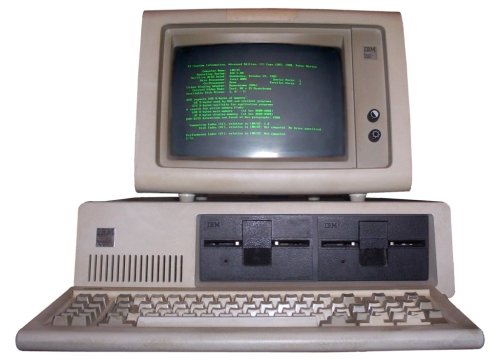
They might have looked a bit like them, but these were no “dumb” terminals! IBM were first, but those of us of a certain age still remember “our first” be it something like the BBC Micro, Commodore 64 or ZX Spectrum.
What these machines allowed was something much smaller than the server model – they didn't need a network connection to a more powerful machine, they could handle all the processing internally, and had a few peripherals like a floppy disk drive and printer if you were lucky.
They took off, with every home and small business could suddenly afford a home PC of some kind, and people found them useful for doing all kinds of things. Computer software and games became a huge industry, supplying what you needed to harness the power of your machine.
But then everything changed …
Along came the internet! And suddenly we started creeping back the other way. We could do things on our home PC, but then connect up to a larger network and share what we'd done. We could have the best of both worlds.
When I first got an internet computer in 1999 I tended to do a lot of work offline, but then upload and share any information I needed to, then go offline again. These days my computer goes on, and I connect online immediately, and if I'm not online (dodgy New Zealand internet connections) I don't feel I can fully realise my computer!
So the Cloud
Well the Cloud is a lot like the old 70s computer model, with a few small differences.
You have a server, which can be anywhere in the world, and you connect to it via the internet. On this Cloud server you can run many different kinds of programs, only instead of using a VT terminal to access the Cloud server, you use most likely either a web browser or some bespoke software (which to all extents is functioning like a web browser).
Heck even better in this modern age – you can even use something like your smartphone to access the power of the Cloud.
So what can you do there?
Well pretty much anything. You know when you're sending Hotmail and using the web browser application to organise your mail, you're using a Cloud application! Likewise, you can write up documents in a Cloud application, and they're kept there.
Here's the good stuff
Being in the Cloud, the data on these servers is accessible to you from anywhere. The benefits of this are …
Mobility of your data. Ever done work at home and forgotten the USB drive you were working on? D'oh! If you're near an internet connection you can access your data.
Backed up and safe. Yeah as long as you have a strong password of course. We've all had computers that have had the hard disk fail for some reason. And no matter how good our backups we almost always lose some data. My best friend Violet actually had a nervous breakdown when her disk died and she lost all her art coursework. It's very upsetting and costly. Many of us back up our digital photos, but in a fire at home, it's likely we'll lose both our originals and the backups.
Secure. We've all heard the stories of someone losing a disk of important information on a train. When we carry media around with us, it's always in danger from theft. And we rarely password protect or encrypt it as we think it's not going to happen to us. With documentation in the Cloud there's no risk of physical theft. Though of course there's the spectre of the hacker to deal with.
Course it's not all quite that easy, there is internet security. If you're a company buying a Cloud solution you need to make sure there is a backup server, and that the backup server is located “elsewhere” from the primary one, so in an earthquake or tsunami like in Christchurch or Japan, you continue to function your business. *
One of the leading lights in providing Cloud service at the moment is Xero, an accountancy application that allows you to keep track of your business incoming/outgoing records. Definitely a company to watch,
But more than likely there'll be a Cloud Camp event somewhere near you this year where you can talk with others about Cloud and what they're up to "in the Cloud" ... These events can be a lot of fun, and are driven by attendees, AND FREE! So no excuse ...
* That seems cruel to talk of business in the face of such tragedy I know. But I worked for a bank during one of the Christchurch earthquakes. They worked tirelessly to get ATMs working, to provide people in Christchurch with immediate extra credit – simply because giving people access to resources to help them through such difficult periods meant that society didn't fall apart and descend into lawlessness (if people can't get money or buy what they need, they tend to try and take it), which would have cause more deaths.
I love Regina Spektor – her music really is very quirky and unique. So when I first listened to her album Far, there was one song which really stood out for me – The Calculation.
It's a lovely, light and breezy track, one of those songs I listen to and visualise in my head.
At the time I was tinkering a lot with stop motion videos, and decided to build one for this song as a project. It was a huge project for me to undertake, but I learned a lot putting it together – and the result, if not a huge internet sensation is something I've watched and enjoyed again and again …
This was in February 2010 – and at the time I knew little of the whole “Agile” methodology.
Looking back on it, I realise how the project shared some attributes of good Agile and software project management …
So what were they? I'm going to talk about them one at a time.
Start with a good idea
Basically I wanted to bring the lyrics of Regina's song to life. I wanted to tell the story of love between two people.
In my collection of models/toys my most pose-able figures are a Barbie doll and a C3PO doll. They would be my “couple” - which would fit nicely into Regina Spektor, because she's a bit quirky, and love between a girl and a robot is a bit unconventional.
Break into bits
People watch the whole video and go “wow that's amazing how did you do it?”. The answer is it's not one movie – it's actually 37.
Basically I sketched out my script ideas on a printed sheet of lyrics, and blocked it into 37 sequences or shots. Some of these scenes were similar – and were collected into themed “sprints” of work.
For instance there are about 6 sequences of Barbie and C3PO holding and moving their stone hearts, which were all filmed together as they used the same models in similar positions with similar “accessories”.
Fail fast
I had a lot of ideas for things to do with my models. Not all of them worked out. Sometimes it would turn out a model couldn't be posed quite as I wanted, so it would be back to the drawing board, as I'd try to figure out something else.
Basically I needed to try things out early to see if they'd work, rather than depend on things working, and be lost when they didn't.
The first sprint I worked on was a repeat loop of Barbie playing a piano. I found several piano toys, but none of them really worked – so I went back to the cover of the Far album,
I decided to try filming Barbie moving as if playing the piano, and create a matte from the album cover, to make it look like Barbie was playing the piano from the album cover – and it worked rather well.
In fact this worked so well it made me quite daring for the “chorus section” in an later sprint – I'd originally planned on having just a dancing Barbie and C3PO – but decided to try and superimpose a slowed down film of flames over them as Regina sang about “this fire is burning us up”.
Avoid rigid planning
As mentioned with the chorus, I broke things down into sequences and sprints. Not everything worked out. Some things were infeasible or just didn't look right, and were binned and replaced.
Some things worked better than I imagined, and I got a bit more daring. The finished project was about 80-90% of what I'd imagined, with a bit of compromise thrown in along the way.
As I worked through I learnt about working with the models and technology, and had a better idea of what I could push to achieve.
Test early
In the old days, they'd do stop motion by putting together a model, take a shot with a film camera, move it a bit, take another shot, move again, another shot and so on.
It'd go on for days, and when done the film would be processed. If there was a blurry frame they'd forgotten to focus the camera in, or a hand in the way of a shot, then it'd be back to the drawing board, and the whole sequence would have to be redone.
My son taught me the following trick in the digital age.
You position your model, take a photo, move, take another photo. THEN – you review your shots on the camera, and flick back and forward between your last couple of shots to make sure the two shots match, and the movement looks right and things look in focus.
You're basically testing early here – and my son taught me that! If the shot looks wrong, you delete it, reposition the model, reshoot. You lose minutes not hours/days!
When a sprint shoot is done, I load it into the computer, put the photos into my animation software (I use AVS Video Editor), and put together all the shots into a video. I aim for 8 shots a second (the professionals go for 25), but I sometimes speed up/slow down what I've shot to make the movement look the right speed for the song.
Reuse
Good software reuses components when it can. Watch my video again, and you'll notice I repeat use a few of my segments. Especially Barbie at the piano. Why reinvent the wheel if you can reuse what you already have? To the first time viewer, it should be barely noticeable anyway.
If I'd not made that decision I think filming would have taken two to three times longer. So it saved me time, and didn't affect the quality of the finished product – so why not.
Putting it all together
So bit by bit I assembled my 37 short films, across about a dozen sprints.
Did I mention I tested again? [You'll notice a theme here] Just because you checked the photos as you were filming, doesn't mean you're done. When you join the photos together as an animation, you can notice defects you didn't quite notice first time around. Especially as you're watching them through a 19” monitor vs a 4” camera display – things become more noticeable.
Some of them mean refilming – which is annoying. Some of them you decide you can live with …
For instance during the sequence “so we made our own computer out of macaroni pieces, and it did our thinking while we lived out life” - R2D2 circles in a figure of 8 around C3PO and Barbie holding hands.
In one shot in the bottom right hand corner you can see a little piece of white tack I didn't notice.
Later on, it “disappears” …
Oops! But I decided “we can live with that” and it didn't detract too much from the scene.
Then with my 37 shots completed, I took the song track, and copied my filmed shots into place over it, compiling my finished video.
Oh – did I mention I tested again? Ah yes, what looked brilliant on the editor, didn't quite work in the finished movie. With so many cuts in the song, it created a lag which meant about a minute into it, the animation was out of sync with the song.
What I ended up doing was cutting the song into about 4 sections, and animated each section to keep it synchronised, checking the output of each, then assembling the four sections into one finished movie, which I then uploaded onto YouTube.
And you know what I did then? Yup I tested again! Making sure it all looked okay, no surprises or lags.
It was only at this point, knowing the quality of my film was assured, I put a link on my Facebook page so all 12 of my friends could watch and enjoy!
Summing up …
The end product was not quite what I'd originally planned, and yet at the same time everything I wanted!
I had a vision, but I had to be pragmatic about it as I developed the project.
Some ideas I found couldn't be realised, others I found I could go even further than I'd originally imagined. Hence what I did achieved more in some areas than originally planned, and less in others. But importantly it got finished, and didn't get stuck in a loop where the effort to achieve a particular shot became painful and time consuming.
Not of course that being Agile means “not doing hard stuff”. But if doing something is so painful, but brings little benefit, you have to ask of your manager “why are we doing this again?”, and consider if it's really worth pursuing.
Throughout I tested and tested what I was doing, to reduce the impact and rework of any mistakes.
The one on the left is totally automated, you press a button, and it delivers a not-bad (but mediocre) coffee, with synthetic milk. And believe me the "latte" is no such thing - it's pure evil!
The one on the right though everyone agrees makes nicer coffee, but no-one uses. It's a manual coffee maker. You have to steam, stir and froth your own milk in a jug, then add an expresso shot or two.
Everyone agrees the one on the right makes nicer coffee, but everyone tends to use the one on the left.
Why? Well no-one really knows exactly how to use everything on the machine on the right, and there are no instructions. I actually always use the one on the right, one of only two people to use it. I've found to get good coffee it's kind of trial and error until I've got it “just right”. I've played with some of the buttons, functions and nozzles. And now I've got a working technique, and an alchemist brew to great coffee.
So why is everyone using the one on the left? People I think are afraid of “getting it wrong”, afraid to “play around” and make a few dreadful coffees, occasionally sending the machine into it's messy clean cycle whilst learning how to operate it.
Much as covered in the famous article “we tried baseball and it didn't work” people are so afraid of getting it wrong they're settling for mediocre coffee, or spending a small fortune getting coffee from Starbucks, whilst I enjoy great coffee provided by work!
We tried fire and it didn't work?
This has had me thinking back to our ancestors – the “prehistoric cave man”.
It's a bit of a misconception that prehistoric man is any different to ourselves (genetically we're identical). Many people feel smug that they're more intelligent than them. Certainly we benefit from better education and knowledge, but they were as educated and (in their own way) as skilled as us. In fact “they are us”.
Which brings me to fire. Again we do pre-historic man a huge disservice by saying they “discovered” fire. Do we talk about the “discovery” of the computer, atomic bomb or laser? No we talk about the “invention” of those things as the word "discovery" is indicative more of accident than design.
Okay so more than likely the first man-made creation of fire might have been accidental. [The same goes for the discovery of penicillin!] Lets look at it as pre-historic man would have seen it. You have created fire, ooh it's nice and warm, it gives off heat and light You just have to see with children the mesmerising effect it has. There would be a huge desire to touch it. And ouch how that burns!
This is where the modern engineer would say “we tried fire … and it didn't work! Lets agree to not make fire again”.
There's no doubt in my mind the first experiences of prehistoric man with fire would have been incredibly negative. “Oooh pretty … ouch it burns … ouch my hair is on fire”.
We all know the benefits of fire – keeps you warm, gives off light, cooks food (killing bacteria), and most animals have a fear of it.
So fire comes with a lot of benefits, but it's not perfect, it has some side effects as well. But to get to all “the good stuff” you have to get through the immediate “bad stuff”. And sometimes the downsides can feel so intimidating. We talk about man “taming fire”. But what we're really talking about is knowing the risks of fire, and “managing them”.
But forget iPhones and atom bombs – things that go in and out of fashion – fire along with the wheel is arguably the greatest invention of mankind. Without fire we don't manage to migrate to colder areas of the world, we don't learn to cook, we don't learn to cure animal hides, we don't learn metallurgy and smelting, we don't learn to generate power. Fire is the invention which drives all these developments.
Fire isn't something that “just happens” - to be able to control fire we need to learn the skills that go with creating fire and controlling it. What's interesting is these knowledge and skills existed before writing, and when vocabulary were basic. Prehistoric man didn't have colleges and books, yet they had effective ways of passing on skills of fire making, control, hunting to the next generation. And through this environmental culture the skills of fire making have been very effectively from one generation to the next right up to modern times, we've not suddenly “forgotten” how to create fire just because someone's not written it down.
So yes indeed – you could say with some authority that fire was the first Agile project!