Monday, September 5, 2016

JAVA 17 - Unique username example

As promised last time, with our theory covered over, I'm going to take you through a couple of additional examples to help you learn.

Today I'm looking at a very useful recipe I use both in Selenium Webdriver and in Monkey Tamper.

In a lot of projects you need a unique username when registering an account.  Generally I have a very disposable attitude to accounts - I like to use them, set as I want, then throw them away.

But typically you need a unique username - I know friends who will use a random generator, but that always has potential to go bad.


The getUniqueName will return a unique username specified by the Unix time in milliseconds.

I use the method System.currentTimeMillis() to get the number of milliseconds since January 1st 1970.  Note I have to use a long integer type for this.

Obviously I've not covered that method, but like you might have to, I used Google to find out what kind of library/methods are available.  I don't think there's a single textbook out there, even one of these, which covers everything you'd need!


Google is great as is StackOverflow - it can show you how the command works, or you might be able to find an example.

I then define the character sequence,

CharSequence css = "1234567890ABCDEFGHIJKLMNOPQRSTUVWXYZ";

This is essentially an array of characters.  I find the length of this array by using css.length() which is similar to the .size() method we've used for ArrayLists.

I repeatedly perform a modulus calculation on the Unix time, dividing by the length of my character sequence.  This gives me any remainder, which I look up in the sequence to give me a character.

I build up a string of these characters as I find the modulus, then actually divide my Unix time, until it's all done.  This turns the time into a handy character sequence ... so for instance ...


I typically append a "User_" in front of this string.  For my system, I get an email for every registered user, so I can backtrace to find any accounts I've created quite easily.

This really useful piece of code can be found here on Github.

JAVA 16 - Classes ... within classes.

So far we've defined a class and even extended a class.

Once defined, you can use a class pretty much as you'd use any variable data types - meaning you can have classes which use classes within them.  You can also have arrays (or better, list arrays) of your class.

In this final part on Java theory, we're going to do just that!

I hate them dices to pieces


So far we've made a great class which simulates the action of a single dice.  But as mentioned, sometimes we need more than just another dice.

I want to keep the dice class as it is, simulating the random-ness of dice.  But I want to have a layer outside of that which will allow me to create groupings of dice.  And within this class I'm going to put a bit more of the rules of the game, and managing my expectations around multiple dice.

This class I'm calling diceGroupClass.

Attributes


In terms of attributes, one of the most important things is to declare a List for my dice.  I know it's going to be important to keep track of how many dice I have, and I did wonder if I should have a integer numDice attribute, but I can use the .size() method that's built into List to keep track of my dice quite easily.

Constructors


I'm expecting a number to be passed on creation of an object for this class - this number will defined the number of dice to be rolled in the group.  If no number is supplied, I'm going to assume it to be 2 dice, and call the constructor with it.

The constructor calls new ArrayList<diceClass>() to set up an ArrayList for the private attribute (though it's declared as the interface type of List in the variables section - see here for why).

It also passes the number of required dice to a function, setNumDice.

setNumDice


I had to have a big think about this - whether I wanted it to be private or public.  I decided to make it public, because I wanted to be able to dynamically change the number of dice I'm using (you'll see why later).

This method is passed the number of dice required, and compares with diceList.size(), then it either,
  • Uses a while loop to use the .add() method to add elements to the ArrayList until it's large enough
  • Uses a different while loop to use the .remove() method to remove elements from the ArrayList until it's small enough.

Yup - I know I'd typically pick on the ISTQB if they had a definition for a method that says .add() adds and .remove() removes.  But folks, it really is what-you-see-is-what-you-get there.

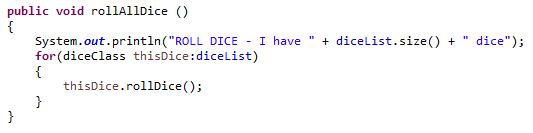
rollAllDice


This uses the really neat loop we've talked about previously for ArrayLists,

for(diceClass thisDice:diceList)

Will loop through each dice in our ArrayList, assigning the element to the handle thisDice.  We then use the .rollDice() method of that class to roll the dice.

sumAllDice


This rolls all the dice using the above method.  Then similar to rollAllDice, loops through each dice element, and adds the dice value to a running total, to get the sum of all the numbers on the dice.

getDiceOverThreshold


This is very similar to sumAllDice, but instead of the total, it uses the .diceOnOrOver method to compare each dice to a rollable number, and return 1 if the dice equals or exceeds.

I've not made a group method like this for .diceOnOrUnder - if you like, have a go.


@Test Roll two dice


Here I just simply want to roll 2 dice, and sum the result


@Test Warhammer Space Marine shooting simulator


This is a more complex test based on the rules of a game called Warhammer 40,000.

Ten Space Marines are shooting at Orks,
  • Each Space Marine gets 1 shot, which allows a dice roll
  • Each shot hits on a dice roll of 3+
  • For each hit you get, you re-roll and cause a wound on a roll of 4+


Here you can see I use the constructor to pass that I originally want 10 dice to be used, then set numHit to the results of the method .getDiceOverThreshold(3).

I then use .setNumDice to resize my group of dice, and re-roll them, using .getDiceOverThreshold(4) to find how many have causes a wound on a 4+ roll.


As always, my code can be found on Github here.


Congratulations if you're reading this, because you've come to the end of our theory.  I've managed to cover what I consider to be the core basics of Java over the last few weeks.  Remember this series is not everything you need to know, but enough to give you a taste of Java and to get exploring.  But most importantly to get you trying out these exercises, if you haven't been trying out some of these programs and modifying yourself, you're missing the main education to be had!

There's a few more things to cover off before we're done - I'm going to go through a couple more examples, then conclude the series with a set of things for you to try out yourself.

Saturday, September 3, 2016

JAVA 15 - Inheritance

So ... we've got a pretty sweet class that represents dice classes all built.  Then this guy happened ...

Tim Hall, aka Kalyr on Twitter.  You see Tim has a broader range of RPG games than even me, and reminded me that there are some games which use dice which don't have numbers on them!


A good example is Halo Fleet Battles by Spartan games - their dice look like this ...


I did some analysis on the dice, for their 6 sides,

  • 1 side has "skull" on it. This represents and absolute fail.
  • 2 sides have "N/A" on them. This is a fail, but can be re-rolled in some circumstances.
  • 2 sides have "One hit" on them. This represents a single hit.
  • 1 side has "Two hits" on it.  This represents two hits, and the user get to re-roll any "N/A" dice.

These dice are fundamental to how Halo Fleet Battles plays - but it doesn't fit well with my original dice class.  What am I to do?

Inheritance

The answer to this is called inheritance - you can build a new class which is derived from another class (which is often called the base class).

This new class is called a child class, and can be declared in a new class definition using the extends keyword,

public class ChildClass extends BaseClass {...

Extends shows sets up the relationship between the BaseClass and the ChildClass.  So for our example, we're going to use ...

public class HaloFleetBattlesDiceClass extends DiceClass {...


A good rule of thumb for when you need a new class derived from an old one is when you say "I need to cover a Halo Fleet battle dice - it's a kind of dice".  Those two words "kind of" are crucial.

That's essentially what we're saying here - that our Halo dice has a lot of similarities with a normal dice, but it has just a few additional pieces of behaviour, which are unique to a Halo dice, so we're going to capture in it's own class but use those features which make sense from the base class for dice.

Accessing elements from the baseclass

There are, however, some problems.  The child class cannot see anything private within the base class - it does make some sense to work with this - although another option is to set things you absolutely need to protected.

Protected means they're visible to the child class, but outside of that, treated as private.  Generally though it's better to think of ways to share this information with getter methods if needed.

Sometimes I will be in the child class, and need to refer to a method in the base class which has been overriden (not as I'd originally written overloaded) - that is has a method in my child class of the same name.  I can access this by using the super keyword to reference attributes or methods in the base class which are public or private.


Let's walk through the Halo Fleet Battles dice class as we build it from the ground up.  You can find the code for this here on Github.

Please note - I have made some minor changes to method names compared to last time - for instance I think getDiceResult is a better method name than diceResult, which sounds like it should be an attribute over a method.

Declare as a child class


We do this using the extends keyword as we talked about.  I've also added a String attribute which describes the dice result, as we're not dealing with simple number here.

Create a constructor


We need a customised constructor here, however we also need to use our base class constructor.  All our dice are 6-sided, so I use super(6) to call the base class constructor with an argument of 6 (to make a 6-sided dice).

Roll Halo dice


I couldn't reuse and override the base class method rollDice, because I want to return a String from this which describes the dice face.  Consequentially, as rollDice isn't redefined in this childClass, I can use rollDice() instead of super.rollDice() to call the base class function.

I then do a switch on the number I get back, and convert it into the appropriate string.

Dice value

This method returns how many hits have been achieved on the dice - and does override the getDiceValue function in the base class.  Hence we have to use super.getDiceValue() ... you should try it without the super, and you'll see how much it doesn't like it!

Our @Test method


Nothing too revolutionary here - just take note of how we're declaring our class using haloFleetBattlesDiceClass.

The output looks like this ...


Interested in more on Halo?


For more information about Halo Fleet Battles, my son and I run a wargaming channel.  Check out our unboxing video here.

Extension material

Look up and read more about,

  • Inheritance
  • Child/parent classes
  • super keyword
  • protected declarations
  • overloading in Java
  • override in Java
Typically in class hierarchies we use,
  • "parent", "base" or "super" class for the original class.  [I like "super" as it reminds me that when we're using the super keyword, we're doing things in the "super" class]
  • "child" or "sub" class for the derived class.

In case you come across different terms, just different ways of saying the same thing.

EDIT - You'll see below Andrew Morton makes a comment, which I've now included to correct.  Thanks Andrew.

Friday, September 2, 2016

JAVA 14 - Encapsulation

So far we've been playing around our first proper class that mimics a dice.

In this dice class I've told you the important of having our attributes as private, and using public methods to manipulate this data if we absolutely need to.

The problem is, we're testers, and we're not known for following rules particularly well ... so here it is ...

Make them public!  What's the worst that could happen?

Remember when Simba was told everything the light touches was his kingdom.  Except that shadowy place ... never go there?


Yeah - this ended up happening.  Damn you Simba, you had one job!


So here's our revised class - I've streamlined it.  And added those public attributes you asked for.


Cool - so let's run a test for it now!


I'm going to side with Uncle Scar on this ..."Simba what have you done?".


Here's the thing about private attributes.  They can only be accessed and changed by class methods.  If the attribute is vital, you can build recording around them to a log file to register changes.  In our class above, I've put print commands for all the methods.  If I had odd data, then I should check those methods with a fine tooth comb.

Now, here's the thing about public attributes.  They can be accessed and changed anywhere.  And on a large coding project, that's a frightening prospect.

It has the potential to be this ...


And sure, you have tools in your compiler and debugger which give you the equivalent of a metal detector and a powerful magnet.  But you've still made more work for yourself than you need.

Most people who write code end up feeling like this ...


Whilst you're learning is a great place to go "I wonder why they say I need to".  Learning is a great time to break rules, but also to learn some good habits.


This approach of only making public the methods that you really need to is called encapsulation, or data hiding.  A bit like the ring of power in Lord Of The Rings, ask yourself "Is it secret?  Is it safe?".


The big reveal

Yeah - well someone was nasty in the @Test method ...


The thing is, with the way you coded your DiceClass method, you didn't stop him from doing this!

You might notice how I'm blaming you dear reader for this, though I wrote it?  Let me just finish with this ...


That code that you made me write can be found here.


Extension material

Google some articles and read up about encapsulation.

JAVA 13 - Constructors and overloading

Last time we started to look at classes in Java and created an initial dice class, which included the following declaration to create a class instance (or object) ...

ClassName  objName = new ClassName();

Here the ClassName() is actually calling a method called the constructor.  Every method has a default constructor, they set up the attributes, although they don't initialise them (that is set to an initial value).

In our previous Java class, we created a dice object, then set up the number of sides on the dice.  Really that's the kind of thing we want to do when we create an object, so it makes sense to define a new constructor to do this.

But first ... packages

Before I go to look at this, it's worth covering off packages.  You can define a package in Eclipse under your project with a right click ...


A package creates a common work area (a bit like a personalise library) - any classes you have under the same package have visibility of public methods and attributes of other classes which are under this area and start with ...

package packageName;

For this piece, we're going to use the packageName of diceGames, so we use,

package diceGames;

From now on we're going to have our @Test methods in a separate class to our code under test.  This is because previously our @Test methods have been part of the class we're testing, which means they rely on the same constructor.  If we're going to make new constructors, we need our @Test methods not to be dependent on them - they really object when you change the default constructor, error below,..


"this" ... this what?

Another item we're introducing is the this. keyword.  We can use this inside methods where we call other methods or use attributes of the class.  The this. keyword refers to the current instance of the object.

So we could for instance have written ...

As ...

And ...

As ...

Usually it doesn't make much difference.  But for constructors it's pretty important.

Our first constructor!

A constructor is a method - but one rather unique, because you don't specify a return value (the object after all is the return value).

Constructors have the same name as their class - so for our class diceClass, we declare a constructor as,

public DiceClass (int sides);

Constructors have to be public (they are after all going to be called outside of the class).  As you can see I can pass parameters in - for this, I'm using an integer number called sides to set how many sides I want.


Here's the @Test method I'm using (under the same package, but in a different class).


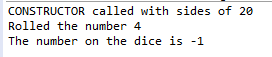
You can see here it calls DiceClass(20), passing 20 to make a 20-sided dice.  This produces ...


Looking good!

Overloaded constructor

Here's the thing, most of the time people when they mean a dice, they mean a 6-sided dice.  I suppose I could always call DiceClass(6).  But I'm too lazy to.

Sometimes you need more than one method, which will do a similar job.  In Java it's possible to have multiple methods with the same name - this is called overloading.

There is a catch though - each method has to be called with a unique combination of data type - so for our diceClass example we could have the following constructors and they'd all play nice,

public DiceClass (int sides);
public DiceClass (int sides, int number);
public DiceClass (String diceName);
public DiceClass (double dimEnsion);
public DiceClass ();

You'll notice you can call with one integer or two integers - because the combination is unique.

However if you use the same data type, it will fail to build, even if you give them different variable names being passed.  So this won't work ...

public DiceClass (int sides);
public DiceClass (int number);
We already have a constructor for which we pass an integer - I want to define one where we don't pass one ...

public DiceClass ();

The code for this constructor is going to look like this ...


Our @Test class will differ only in that it'll use DiceClass() without an argument being passed.


This works perfectly as expected!


Calling one constructor ... from inside another constructor

Here's the thing - the new constructor works okay ... but I know I've created two now which I'll have to maintain in the long run.  Darn!

There's a fix for this - and why we've started to use the this keyword.

Within my default DiceClass() constructor, I can use the this keyword to call another constructor by using it as a method caller for the class constructor.  I can do this by writing the following code


Here this(6) is basically behaving as if DiceClass(6) was being called ...


The code is available in Github here.

Do we need to define our own constructors?

It's not always crucial.  But just remember that if you don't, then your attributes aren't set to initial value - maybe that matters, maybe it doesn't.  It all depends on your class.

This way, we don't have to remember to set the number of sides on the dice every time we call one - which is cleaner.  If we forget to set one, it'll be set to 6-sided, which is a good default.


Extension material

Download a copy of the DiceClass, and try making the constructors private.  What happens?

We looked at some important, and complex topics today, you might want to look more into
  • packages
  • this
  • overloading
Remember, Google is your friend!