Wednesday, September 14, 2016

Useful responsive design test aids

I've been recently returning to do some responsive design testing.  I wrote previously about it here.

I get a decent variety of challenges at my work, so I'm almost amazed to be revisiting this after an absence (I've been looking at NFRs) to see there are some really useful tools out there.

Developer tools ... mobile mode

This one just blew me away!  What happened next ... okay I'll tone down the clickbait.

But newer versions of browser, if you go into dev tools (F12 on Chrome) have a responsive design option, which allows you to simulate screen sizes, even flipping your screen from landscape to portairt and back.

Mind ... blown ....

You're looking for the following button,

Here,


I can rotate with this ...


 You can select from a list of settings for different popular devices ...


This is a really great tool for helping initial testing.  But as with my previous article, be aware that you're not using the proper device browser, and items like drop downs and pop-ups are handled radically different on mobile devices.


Vysor

This is a Google Chrome app.

Because I'm doing more with mobiles, I need to be able to demo more on mobiles.  Our work has a lot of projects with VGA, and when I asked if it was possible to get a new state-of-the-art projector to run our demos on from the phone, I'm afraid I kind of got this look from my managers ...


This only works for Android phones, for which you need to also download the Vysor app from the Play Store.  You'll also have to put your phone into developer mode - you'll have to Google how to do that for your device - usually you hit an option 7 times in the settings, which unlocks developer settings like an Easter egg bonus.


More than just showing the contents of your mobile device, you can also manipulate it using the mouse and keyboard.  I like this because when I'm doing a lot of repetitive tasks, it's all a bit easier, plus I can screenshot to my heart's delight.  Good times!

JAVA 22 - Methods aren't always pass by value

Well - I thought we were done!  The funny thing about learning, you never really are done.

Today before leaving, I have a conversation with one of our new developers who's learning Java about passing values to methods.

We covered this back a way ago here, where we passed primitive data types, and could see if we changed the value in the method, it didn't affect the value passed, because primitives are passed by value.  You can find the exact code on Github here.

My developer, David, was looking at this item on StackOverflow (it's a great source of information and worked-through problems, which always comes up in any Google search).

That example given seemed to be saying that if you pass an object, rather than just a primitive data type (integer, String etc), then you are passing the object by reference.  This means that any changes you make the to item you've been passed get made to the original object itself - you are NOT creating a copy as with primitive variables.

Even our more experienced developer was sure this was wrong.  I managed to talk them into looking at it from my perspective, in the only way that really matters - let's build it and find out!

We have the following simple dogClass to keep methods,


And the following variations of methods,


For these methods,

  • changeNameByString changes the value of a String that is passed to it
  • changeNameUsingMethod calls a method within the class to change the name
  • changeNameUsingAttribute changes the attribute itself, which I've naughtily left public (hey, it's an educational test, it's allowed for curiosity)
  • getNewDog assigns a newly declared dogClass to the object passed
  • returnNewDog returns a newly declared dogClass


Here's my test ...


And here's the result ...


So basically, if you pass an object to a method, and manipulate it, the changes will happen to the original [changeNameUsingMethod  & changeNameUsingAttribute ]

If you use the method to create a new object [getNewDog], that object will be lost, unless you return it, and assign the new object to the old one [returnNewDog].

If you pass an attribute for the method, then change it, those changes are lost when you leave the method - basically a copy is made [changeNameByString].

This was a really fun piece of learning for all of us.  It also highlights my testing approach to development - which is "find a way to test and check what happens - come up with variations, and see what happens".  Don't be so sure that something can't possibly happen - find evidence to prove or disprove.

If you're shocked with the result, then you've found an area to learn more about.  Target some study there.

And most of all, have fun!


Find this example here in Github.

Saturday, September 10, 2016

JAVA 21 - Get coding!

So that's it!  We've gone through a lot of theory and examples together.

Next steps?  Well maybe Alan Richardson's book on Java For Testers is a good start  if you've not picked it up already.  But above all else, get coding, get practicing, get learning.

The following are a set of ideas for you to try out as revision for what we've covered so far.  Try not to go back to my code, but do use the internet to look up functions - most programmers do!

Revision exercises


  1. Create a HelloWorld program
  2. Create a HelloWorld program, where "Hello World"is declared as a string printMe, and passed to be printed.
  3. Create a HelloWorld program. Declare "Hello"as string Str1, and "World" as string Str2.  How do you put them together into string printMe to be published?
  4. Create a method printHelloWorld, which does just that.
  5. Use a loop to call printHelloWorld 10 times.
  6. Create a functon called printGutenTag, which prints "Guten Tag".  Create a loop which prints "Hello World" on odd numbers, and "Guten Tag" on even numbers, using if statements.
  7. Create a class called Card which has two attributes "suite" and "value".  Create a method for setting these values, and for getting the value of the card.
  8. Create a class called CardDeck, which contains 52 cards.  Create a method to draw a card at random.
  9. Look up Conways Game Of Life.  Create a class for a cell, and a series of JUnit tests for it.
  10. Look at our recent examples of Game Of Life, Character Creation or Account User.  Add some more JUnit tests which include assertions.


Building on character creation

The customer wants the following addition to our character creation code.


[REQ_1]  Add a combat system onto our Character Creation.  Characters must first hit with their weapon, then wound.
[REQ_2]  To hit - characters must roll equal or under their fighting attribute if doing hand-to-hand or shooting if done with a ranged attack.  This roll is done on a D20 (20 sided dice, with 20 always high).
[REQ_3]  If the character has the skill martial arts for hand-to-hand or archery for ranged attacks, they get to reroll a failed miss if it occurs (but the next result stands as is).
[REQ_4]  If they roll a 1 to hit, it's an automatic wound (skip the to wound roll)
[REQ_5]  To wound - if the character rolls equal or under their strength, they cause the loss of 1 health from their opponent.
[REQ_6]  If they roll a 1, then they cause the loss of D6 health in a critical hit.

Add code to support the above, including any JUnit tests needed.


Building on Account User

Revisit our account user code.

[REQ_7]  It's been decided, users will now user have their username created for them.  Use the method from unique username to create their username automatically on creation.
[REQ_8]  Sometimes there's just too many audits to read through.  Create a method to print out only audits which contain a certain action/phrase and test it.


Add code to support the above, including any JUnit tests needed.

JAVA 20 - Customer Account

Just a disclaimer, the code I've produced here forms a working model of a customer account class to work with.  This is not intended to be a demonstrator of good design for a customer account management system, just a working model we can play around with.

In this last worked out example, we're going to create code for a customer account management system.

Our requirements


[REQ_1]  Users can register their account by providing us their username, an initial password, and their date of birth.

[REQ_2]  Throughout their lifetime with us, customers or people with admin privileges can add or change the following details to a customer account,
  • Full name
  • Mailing address
  • Email
  • Phone number

[REQ_3]  Only the account owner is able to change their password.

[REQ_4]  The username and date of birth are fixed at account creation, and cannot be amended.  In the rare case where someone has forgotten their own birthday, we'll get the value changed in the database.

[REQ_5]  Both the account owner and admins are able to view account details.

[REQ_6]  The account will be fully audited, including every time change of data, every time it's viewed, every time access is denied.  

[REQ_7]  Details of passwords will not be displayed, either within account details or in account view.

[REQ_8]  The account view will also list all audit events.


The solution

I'm not going to go into the same level of detail I have with previous projects.  The code can be found here on Github.

Probably the key thing to look at here is the AuditEvent class.


We have a whole List of these audit objects within our customer CustomerAccountClass.


We add a new AuditEvent for everything we do.


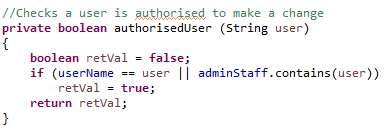
I have a pretty obvious method to check permissions when needed - it's assumed that the method receives the username of the person trying to perform the change.


I mentioned this in the comment in the constructor, but I added a List of admin staff usernames, who have permission to make changes.  The way I did that was a bit of a hack, but hey, I don't want to build a whole system for my demo here.


So when you run, this is a taste of what you get - quite neat!


Extension material

Create admin class

The adminStaff List included within the customer account class is ugly.  Create a class which contains a list of admin staff, and returns whether someone is authorised to make changes or not.

This will separate out between customer data & methods and admin data & methods, and so be considerably tidier.

Don't forget to declare this admin staff within your @Test methods.

Date of birth

I currently handle date of birth as a String, which was just for quick convenience.  Replace it with a date format, you will have to Google to find what types you can find in Java.

Tuesday, September 6, 2016

JAVA 19 - RPG Character Class

The following example is a class which allows you to create a role playing (RPG) character.  Below are the rules ...

Character attributes and skills
Character are given a name on creation, they are also set the following attributes,
  • Fighting - how good they are at close combat
  • Shooting - how good they are at ranged combat
  • Strength - how hard they can hit/pull back a bow
  • Health - their maximum health

In addition, they can have a list of skills or advantages that they've gained.
Character Level And Experience
All characters start at level 1, and as they go through they gain experience (XP).
Characters can spend 1000 XP to "level up" where they can either,
  • Increase an attribute by 1, to a maximum of 18.
  • Add a skill/advantage

This will increase their level by 1.
Taking damage/recovery
Characters have a status called current health.  This can only ever be the maximum of their health attribute.  However if they take damage, it will decrease.
If it falls to 0, they die.  However characters with the "cheat death" skill can fake their death, they have a 50% chance of being only mostly dead, and merely pining for the ffordes.  In which case they retain their last health point.
Characters can regenerate, gaining 2 x D6 current health back.  But this costs 100XP.  So don't spent it all, keep some in reserve.

Not surprisingly, this is our most complex piece of code yet ...

Attributes


Constructor


Not surprisingly, the constructor sets much of the attributes.  After creation, fighting/shooting/strength/health can only be changed through experience.

Print character sheet

It's useful to be able to see all the attributes ...


Add experience

Pretty simple - this adds experience to the character's pool.


Level up

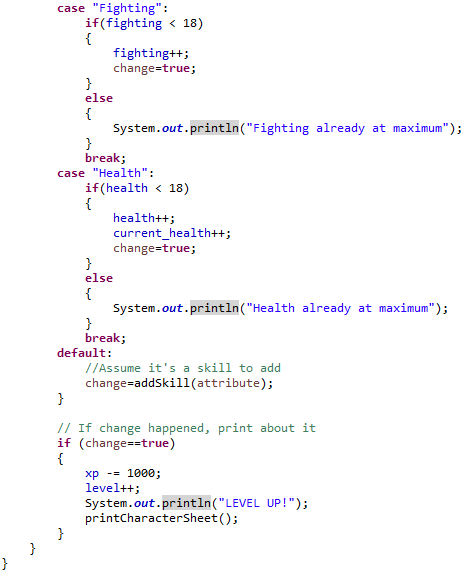
Probably our most complex method to date - first of all it makes sure you have the 1000 experience to do this.

Then, if you've selected "Fighting", "Shooting", "Strength" or "Health", and these values are below 18, then they're increased.  In the case of health, your current health is also increased.

If you provide something other than these keywords, it assumes you are adding a skill, so adds to the list of skills.

You then have 1000 experience deducted, and your level increased by 1.


Add skill method is defined here ...


Wounds/healing/regeneration

Finally we have taking a wound, healing and regeneration, which are all here.  By now you should be getting good at reading this ...


The Disney Avenger Initiative

The world of the Disney comics is under threat from a whole lot of extraterrestrial threat - yeah, worse than this guy ...


So, agent Cobra Bubbles is calling in his own Avengers Initiative, and recruiting people with extra-ordinary abilities to be Planet Earth's first line of defense!


I'm going to use @Test methods to simulate some familiar Disney heroes for this RPG.

Mulan


Thanks to her extensive training, she is a highly skilled warrior,

  • Her fighting skill increases twice
  • She is proficient at cross-dressing
  • She has the martial arts skill
  • She is resilient, not taking defeat easily
  • She is a natural leader


Merida


A deadly shot with a bow, to put Robin Hood to shame ...


Tinkerbell


One of the lowest characters in terms of health, however her high strength reflects the increased damage from her magic.

She also has access to a magic wand and can fly.  Don't make her think unhappy thoughts.


Pocahontas

Give the girl a break, she was involved with Mel Gibson at one point.

Pocahontas excels at tracking, running and understanding foreign languages.  She's a pretty mean fighter when she wants to be as well.


Snow White

Because, y'know, kissing a supposedly "dead girl" isn't at all creepy is it?  Seriously, didn't your parents bring you up better than this?

No possum on earth can fake death quite like Snow White, she's also able to make animals do her bidding.  What kind of superpower is that?  I guess you've never seen The Birds then ...


Princess Jasmine


Her strength and health might seem abnormal, but this reflects how her pet tiger Rajah is always by her side protecting her.  She's also borrowed Aladdin's flying carpet.


Princess Ariel


Not only can she breath under water, she's really good at swimming.  She can also talk to the animals ... well the marine ones anyway.  Don't be surprised if her dad's got his very own Kraken - best be on her good side.


Queen Elsa


She has superb powers to control the realm of the ice and snow.  From the midnight sun, where the hot springs flow.

As you're probably aware, the cold doesn't bother her anyway.


The code for this can be found here on Github.

Does this need more tests?

Well, you might have noticed, I've got so swept up in character creation, that there are a lot more @Test methods especially using assertTrue and assertFalse needed to check some of that behaviour.

You're right - it needs them.  And guess who's going to do it?

JAVA 18 - Conway's Game Of Life example

Conway's Game Of Life is an algorithm used to simulate complex patterns - you can read more here.

We're going to build a class to enable us to reproduce the following logic for a single cell,

The universe of the Game of Life is an infinite two-dimensional orthogonal grid of square cells, each of which is in one of two possible states, alive or dead. Every cell interacts with its eight neighbours, which are the cells that are horizontally, vertically, or diagonally adjacent. At each step in time, the following transitions occur:

  • Any live cell with fewer than two live neighbours dies, as if caused by under-population.
  • Any live cell with two or three live neighbours lives on to the next generation.
  • Any live cell with more than three live neighbours dies, as if by over-population.
  • Any dead cell with exactly three live neighbours becomes a live cell, as if by reproduction.
Attributes

For just a cell (all we're modelling at this point) there are two obvious attributes
  • isAlive - whether the cell is alive or not
  • numLiveNeighbours - the number of live neighbours the cell has


Methods - basic

I decided not to bother with complicated constructors and just use the basic one.  However I decided to "getter and setter" my attributes (make get and set methods for each).  This would allow me to configure a cell as I needed it configured.


Conway's Rules Method

This applies the above Conway's rules to the cell, and change the status.


Test it

The following are 3 @Test methods for my class - it really needs a lot more ...


I set up my cell, then assert it's in the state I expect.

The code is available in Github here.


Extension material

Create some more @Tests for this class.