This is part 29 of my automation series - for our story to date, check out the list of articles here.
Technical level: **
Just a couple posts ago we were looking at the goal of automaton. In general terms, what I get from every group I've talked to is something along the line of "speedy feedback". We're trying to shorten and supercharge the feedback loop from someone committing a change to being told "the system doesn't work".
So what's an ideal time for it to take? This is important.
Obviously we want it to take longer than doing it manually, otherwise what's the point?
Different groups had different ideas about this. Most just wanted some kind of "thumbs up" or "thumbs down" indicator on build quality. And they wanted it quite quickly. For others there was a rigorous series of regression tests they needed to run on the system, and they were trying to speed this up from "currently takes a couple of weeks".
I'm going to call these two drivers "build quality" and "regression". They will dramatically change the timeframe we'll be looking at. For both these drivers though, the first port of call for making things as fast as possible is to embrace the automation pyramid and to be sure to be doing at the unit or API level those checks which make sense to do there.
Driven by "build quality"
A developer finishes a code or configuration change, and wants to commit to the test environment. But first they have to run a series of checks to make sure what's being deployed isn't obviously broken.
Ideally you want these to run as fast as possible. The ideal time I've often heard of is about 20 minutes (the office joke is we've got a cafe on our ground floor, and this is the time it takes to have a pizza made and delivered). Certainly any more than 40 minutes is painful. It leads to "I guess I just kick this off before I leave and hope I'm first in tomorrow morning" *
There are ways to go faster. Selenium GRID allows you to perform automation tests in something like a multi-threaded environment (running multiple things concurrently). Katrina Clokie wrote an article about adoption of this at BNZ here.
Using technology to help you go faster is a definite must, it's the driving force behind trying to use the pyramid to make sure your checks are at the place where they can run most efficiently. If you're testing hundreds of business logic combinations, do it at the unit level.
This picture though highlights something to be aware of ...
If you've got an elephant on a motorbike, and need to go faster, the first port of call is to buy a more powerful motorcycle (faster machines, Selenium GRID).
If that's still not working, it might be time to put the elephant on a diet. That means looking through your build tests, and taking a hard critical look as "do we need them all?". Potentially scaling it back.
Driven by "regression"
Is the driver for your automation is regression test coverage, you're probably aiming for a much bigger suite, with much longer runtimes.
It's as important even though you're looking at maybe running over days vs running in well under an hour, to still embrace the pyramid and try to have your checks running as efficiently as possible.
A few areas I've spoken with to have embraced both "build driven" and "regression". Typically the post-build checks that they run are a cut down version of the regression test suit (hey, that means reuse), but of the top critical behaviours.
There's still a need to try and avoid the feeling of the elephant on the bike. More automation means more to maintain, and you want to try and avoid trying to service and carry going forward tests which are trivial in nature.
At the beginning of this series I told about the test manager who'd make us run scripts which checked for every bug that we'd ever found (no matter how trivial), and how painful that got in time. When I was at Agile Test Days in Germany, I happened to meet a fellow tester from the project included in that experience report, and we talked about how painful that approach had become. So much so that the prohibitive cost of testing like that eventually led to us losing future contract work with that customer (the unit manager happened to be a school friend, and had confirmed that). And for all that rerunning of those tests, we never once found a recurrence of one of those bugs to warrant the time.
[To be clear, I learned from that test manager the important of going deeper in testing than I'd normally do. But I learned in trying to engage with that test manager and the business involved, the importance of revising testing to quite that level if we're not getting defects about the product illuminated.]
* When I was a developer, waiting for the build to finish drove me nuts. If it was a short build, I might update some documentation, then write a humorous meme to my friends. If it was longer, I'd try and remote log in on spare machine, and trawl through the defect list to find a relatively simple bug I might be able to knock out of the park. This might be a bigger mistake than the comedy meme as I'd end up switching context so would forget some of what I'd done from the compile and test that was going on!
Showing posts with label Test Automation. Show all posts
Sunday, January 29, 2017
Friday, January 27, 2017
AUTOMATION 28 - Some checks are faster than others ... surviving The Pyramid Of Doom
This is part 28 of my automation series - for our story to date, check out the list of articles here.
Technical level: **
All the way back in part 4, I talked about a zoology of automation types. My lingo has evolved a bit, and I sometimes talk about "the automation spectrum" or yesterday I talked about "the automation toolbox". Different terms for the same thing. 😉
There are three basic types of automation we've been talking about to date,
A decade ago when we were talking about automation within the context of testing, we were almost always thinking about a GUI test tool. Typically the notoriously unreliable record-and-playback tools.
To really be smart in their use, it helps to not just choose one, but to learn to use them all.
Why? What's the advantage?
One of the key things is speed!
Try using this online dice roller here. When you click to roll the dice it,
All told it can take about 2 seconds for a roll. There is another site which is as slow, and there's an animation which shows a rolling dice, so it really can't go faster.
When we were looking at dice rolling under our unit test, we were able to run about 600,000 dice rolls in the same time. All that test needed to do was to call the method which generated the random number. So the round-trip is considerably faster (it helps it doesn't have to travel half way around the world and back for sure).
This is generally what we find in automation - unit testing is several orders of magnitude faster than GUI testing, with API testing somewhere in-between.
In my consultation with different automators, a great piece of advice they've given is all around thinking about testing at the appropriate layer. This was summed up by a quote "don't test the database with a GUI tool". A bit like the online dice roller, you have to take a long trip through a lot of layers, which you need to do once in a while, but if there's a lot of test you need to do, you want to move them much closer to the area you're testing.
An example came out last week when we were talking about ways to test a csv file upload. I showed a method I used, we have line-by-line error messaging for uploads, so I make a file full of friendly uploads. Then I make one where the first line is good, but line by line I break a rule - whether too many characters here, or a number in a text only field etc.
It makes for a great manual test, and we were thinking about how to automate it, originally as a GUI test. Then we realised that each line where I'd kept or broke the rules really belonged as a JUnit test - it'd be much faster that way.
Something else which came out when we discussed this further at our company technical test study group was there was another reason to push for more JUnit testing. It's also far easier to write a JUnit test for complicated data than it is to write a GUI one,
This makes for much simpler tests, but it brings challenges. Developers and testers need to be able to look more at what's in place in terms of unit tests, and to make things visible. We tend to have lovely dashboard for status of GUI and API tests, but the JUnit checks can be a little less visible to a tester (although you'd hope if a test fails, it won't build, so it'd be always 100% right?).
Beware The Pyramid Of Doom! *
The idea that to take best use of the speed of unit and API tests (which also tend to be more robust as well because data and interface items tend to change much less than GUI elements) you need more of them than GUI tests has been represented in a model you've probably heard of called the automation pyramid which I first read about in Lisa Crispin and Janet Gregories Agile Testing.
Simply put, because they're so much faster and easier, you'll want more unit tests than API tests than GUI tests.
Hopefully you'll see from the above why - faster and simpler!
Lisa and Janet's book was written in 2009, but as we discussed in our study group, go back just a few years around New Zealand, and we pretty much had a test pyramid then ... it just went the other way ...
As we've embraced more agile methodology and particularly the idea of automation as a toolbox over a tool, we're taking huge leaps to embrace this pyramid more in our use of automation.
* Unless you haven't noticed, The Pyramid Of Doom in automation looks somewhat like this ...
Technical level: **
All the way back in part 4, I talked about a zoology of automation types. My lingo has evolved a bit, and I sometimes talk about "the automation spectrum" or yesterday I talked about "the automation toolbox". Different terms for the same thing. 😉
There are three basic types of automation we've been talking about to date,
- Unit testing, which occurs on parts of the code itself. It's really great for checking business rules.
- API testing, which involves the integration usually of an application layer to a lower layer, but can be used to drive a front end as well. It works by inserting commands and scenarios for a system to react.
- GUI testing, which is testing from the user interface. Entering data, pushing buttons etc.
A decade ago when we were talking about automation within the context of testing, we were almost always thinking about a GUI test tool. Typically the notoriously unreliable record-and-playback tools.
To really be smart in their use, it helps to not just choose one, but to learn to use them all.
Why? What's the advantage?
One of the key things is speed!
Try using this online dice roller here. When you click to roll the dice it,
- sends a request back to the server
- the server rolls a dice
- the server renders a new page
- your browser has to load up a new page (I know because I'm on a slow connection and can see it loading)
- the page has to download an image corresponding to the number (it takes a moment for this to load too)
- done
All told it can take about 2 seconds for a roll. There is another site which is as slow, and there's an animation which shows a rolling dice, so it really can't go faster.
When we were looking at dice rolling under our unit test, we were able to run about 600,000 dice rolls in the same time. All that test needed to do was to call the method which generated the random number. So the round-trip is considerably faster (it helps it doesn't have to travel half way around the world and back for sure).
This is generally what we find in automation - unit testing is several orders of magnitude faster than GUI testing, with API testing somewhere in-between.
In my consultation with different automators, a great piece of advice they've given is all around thinking about testing at the appropriate layer. This was summed up by a quote "don't test the database with a GUI tool". A bit like the online dice roller, you have to take a long trip through a lot of layers, which you need to do once in a while, but if there's a lot of test you need to do, you want to move them much closer to the area you're testing.
An example came out last week when we were talking about ways to test a csv file upload. I showed a method I used, we have line-by-line error messaging for uploads, so I make a file full of friendly uploads. Then I make one where the first line is good, but line by line I break a rule - whether too many characters here, or a number in a text only field etc.
It makes for a great manual test, and we were thinking about how to automate it, originally as a GUI test. Then we realised that each line where I'd kept or broke the rules really belonged as a JUnit test - it'd be much faster that way.
Something else which came out when we discussed this further at our company technical test study group was there was another reason to push for more JUnit testing. It's also far easier to write a JUnit test for complicated data than it is to write a GUI one,
- In a GUI test you tend to have to create a data item going through a series of processes. For instance if you needed a suspended customer account, you might have to create it, validate it, then go in as an admin and suspend.
- In a JUnit test you can just declare an item, and have the ability inside the code to set certain fields. For instance, "declare a customer object, and set the status to suspended".
This makes for much simpler tests, but it brings challenges. Developers and testers need to be able to look more at what's in place in terms of unit tests, and to make things visible. We tend to have lovely dashboard for status of GUI and API tests, but the JUnit checks can be a little less visible to a tester (although you'd hope if a test fails, it won't build, so it'd be always 100% right?).
Beware The Pyramid Of Doom! *
The idea that to take best use of the speed of unit and API tests (which also tend to be more robust as well because data and interface items tend to change much less than GUI elements) you need more of them than GUI tests has been represented in a model you've probably heard of called the automation pyramid which I first read about in Lisa Crispin and Janet Gregories Agile Testing.
Simply put, because they're so much faster and easier, you'll want more unit tests than API tests than GUI tests.
Hopefully you'll see from the above why - faster and simpler!
Lisa and Janet's book was written in 2009, but as we discussed in our study group, go back just a few years around New Zealand, and we pretty much had a test pyramid then ... it just went the other way ...
As we've embraced more agile methodology and particularly the idea of automation as a toolbox over a tool, we're taking huge leaps to embrace this pyramid more in our use of automation.
* Unless you haven't noticed, The Pyramid Of Doom in automation looks somewhat like this ...
AUTOMATION 27 - Goals, constraints, strategy
Technical level: **
I originally posted my planned curriculum here back in June. It was based on my understanding of automation at the time.
I've used the series and the interest it's generated to engage with a lot of testers. I've spoken with a lot of automators around Wellington, and when I've been in conference. I've collected all their stories, sifted them, and clustered the points they've raised.
A lot of what they've said has been nice affirmations of what I already knew. But truth is, we engage with others not only to confirm our biases, but hopefully to learn and to stretch ourselves. Today we're going to revisit some material which probably should go right at the beginning. Most of it doesn't undermine what I've talked about before, but it does expand on it nicely.
Goal
I talked about this previously here under "automation as a service", but I'm shifting focus a little to really think more firmly about goals.
We're used to people coming up to us when talking about automation and saying "oh my god, there is a great tool, a fantastic tool". We tend to start with this magic tool that everyone says is so easy to use.
In all my conversations last year I noticed a common theme about people who had stories to tell me. They were all what I've come to call "second generation automators".
They had a common tale which went something like "we started using this system ... it was record and playback because our testers didn't know how to code". The rest of their story played out pretty much as one of my denial case studies - they'd invested heavily in the tool, but every time the code changed, all the tests broke, and the maintenance for that was painful.
Inevitably what happened is they had to bin what they'd done to date and start again. But second time around despite being under incredible pressure to get underway, many of they used the time to plan out much more.
To do this many reflected on their goals. A common theme of those goals were that they were trying to speed up the feedback process. If a new build came out, they wanted to find the obvious problems quickly. These tended to be around making sure they could complete an end-to-end transaction, and that key activities could be completed.
There were differences of opinion about whether the automation was there to evaluate a new build vs doing a deep regression test. And we'll talk about that more precisely in a later article.
The two key constraints of automation
From their previous failed attempts at automation, there were two key constraints which groups had come to appreciate,
Automation takes time to do well
That record-and-playback tool they'd used before, that could write a script as you tested? They'd got burned there because every time they're try to rerun it, it'd need a tweak or ten.
Generally you could create an automated script full of checks in the time it'd take you to run about a dozen manually. If you were going to automate something you had to be sure it was something that had value in checking repeatedly.
Every group used what I call "the strategy of focus" to deal with this constraint. They knew their automation was going to take a while - they'd never probably automate everything. What they needed it to do was to check (a) critical elements and (b) anything that too a long time to do manually.
I had a great chat with an automation guru from TradeMe who had this great insight. If you're working especially on an agile team, you always are working from your most critical elements to your least critical. It can be a trap for testers to work on new features, and want to automate them. But in truth the most critical features to your system are those you've already built!
Every group tried in some way to accept that the automation would be an ongoing concern. They key solution was to prioritise and focus. They all tried to involve testers in capturing ideas for automated scripts. One of my favourite tales was of a group which kept a spreadsheet where testers could contribute ideas for script as they came to them, and the whole team would vote to prioritise what to build next. Democracy in action!
And don't fall into my key trap. I often find myself going that "everyone" means developers and testers. Sure testers are a great source of ideas for automation scenarios - we excel at this. But don't forget particularly to get business people in to help prioritise and come up with ideas. Occasionally they'll say "this happened once in production", and the thing that happened really scared them, they'd like to know everything has been done to reduce the risk of it ever happening again. That's the kind of thing that's worth doing. Not necessarily every bug that made it to production, but the ones that gave the business the jitters.
Automation needs some training/expertise to make maintainable
Again, this came from the sting of "anyone can create scripts using our record-and-playback". That had got groups into a mess.
There was an embracing of the fact that to write automation, you needed some kind of training and some kinds of coding skills. But also you didn't want to pick up a tool for which you needed specialist bespoke training - what I like to call "Hogwarts for automation".
Generally there's a desire to use a commonly available language. If you're a software shop that develops in Java, it probably makes a lot of sense to develop your automation in Java. You might have some people around who not only can help, but are really good at creating and designing maintainable Java code (you're really hope).
[Side story, once for a customer I had to learn to problem in Lisp to use their automation. A truly bizarre language, and one of the oldest programming languages still used]
Selenium Webdriver with Java is a really popular combination. It was one of the reasons that I spun off my Java series. But it's important to remember this is just a handy GUI automation, as we've talked about previously, finding room for good unit and API testing is really crucial (and we'll talk about this later).
Indeed this was an important takeaway. Many groups had been lured into their first attempt at automation through the sales pitch of "a tool". But they'd come to appreciate that automation was not a tool, but a toolbox. Much like when an engineer comes to your house, she doesn't just bring one spanner, she brings a toolbox!
Unit testing, API testing, units testing are different tools in our automation toolbox, and it's important we learn to use the right one for the right job. Which leads me to my next post ...
Want to know more?
I'm talking at the upcoming Unicom automation conference in Wellington. I will be speaking about some of what I've learned not only from my experience, but through going out and talking to people about their automation strategies. There'll be some other great speakers there as well!
I originally posted my planned curriculum here back in June. It was based on my understanding of automation at the time.
I've used the series and the interest it's generated to engage with a lot of testers. I've spoken with a lot of automators around Wellington, and when I've been in conference. I've collected all their stories, sifted them, and clustered the points they've raised.
A lot of what they've said has been nice affirmations of what I already knew. But truth is, we engage with others not only to confirm our biases, but hopefully to learn and to stretch ourselves. Today we're going to revisit some material which probably should go right at the beginning. Most of it doesn't undermine what I've talked about before, but it does expand on it nicely.
Goal
I talked about this previously here under "automation as a service", but I'm shifting focus a little to really think more firmly about goals.
We're used to people coming up to us when talking about automation and saying "oh my god, there is a great tool, a fantastic tool". We tend to start with this magic tool that everyone says is so easy to use.
In all my conversations last year I noticed a common theme about people who had stories to tell me. They were all what I've come to call "second generation automators".
They had a common tale which went something like "we started using this system ... it was record and playback because our testers didn't know how to code". The rest of their story played out pretty much as one of my denial case studies - they'd invested heavily in the tool, but every time the code changed, all the tests broke, and the maintenance for that was painful.
Inevitably what happened is they had to bin what they'd done to date and start again. But second time around despite being under incredible pressure to get underway, many of they used the time to plan out much more.
To do this many reflected on their goals. A common theme of those goals were that they were trying to speed up the feedback process. If a new build came out, they wanted to find the obvious problems quickly. These tended to be around making sure they could complete an end-to-end transaction, and that key activities could be completed.
There were differences of opinion about whether the automation was there to evaluate a new build vs doing a deep regression test. And we'll talk about that more precisely in a later article.
The two key constraints of automation
From their previous failed attempts at automation, there were two key constraints which groups had come to appreciate,
- Automation takes time to do well
- Automation needs some training/expertise to make maintainable
Automation takes time to do well
That record-and-playback tool they'd used before, that could write a script as you tested? They'd got burned there because every time they're try to rerun it, it'd need a tweak or ten.
Generally you could create an automated script full of checks in the time it'd take you to run about a dozen manually. If you were going to automate something you had to be sure it was something that had value in checking repeatedly.
Every group used what I call "the strategy of focus" to deal with this constraint. They knew their automation was going to take a while - they'd never probably automate everything. What they needed it to do was to check (a) critical elements and (b) anything that too a long time to do manually.
I had a great chat with an automation guru from TradeMe who had this great insight. If you're working especially on an agile team, you always are working from your most critical elements to your least critical. It can be a trap for testers to work on new features, and want to automate them. But in truth the most critical features to your system are those you've already built!
Every group tried in some way to accept that the automation would be an ongoing concern. They key solution was to prioritise and focus. They all tried to involve testers in capturing ideas for automated scripts. One of my favourite tales was of a group which kept a spreadsheet where testers could contribute ideas for script as they came to them, and the whole team would vote to prioritise what to build next. Democracy in action!
And don't fall into my key trap. I often find myself going that "everyone" means developers and testers. Sure testers are a great source of ideas for automation scenarios - we excel at this. But don't forget particularly to get business people in to help prioritise and come up with ideas. Occasionally they'll say "this happened once in production", and the thing that happened really scared them, they'd like to know everything has been done to reduce the risk of it ever happening again. That's the kind of thing that's worth doing. Not necessarily every bug that made it to production, but the ones that gave the business the jitters.
Automation needs some training/expertise to make maintainable
Again, this came from the sting of "anyone can create scripts using our record-and-playback". That had got groups into a mess.
There was an embracing of the fact that to write automation, you needed some kind of training and some kinds of coding skills. But also you didn't want to pick up a tool for which you needed specialist bespoke training - what I like to call "Hogwarts for automation".
Generally there's a desire to use a commonly available language. If you're a software shop that develops in Java, it probably makes a lot of sense to develop your automation in Java. You might have some people around who not only can help, but are really good at creating and designing maintainable Java code (you're really hope).
[Side story, once for a customer I had to learn to problem in Lisp to use their automation. A truly bizarre language, and one of the oldest programming languages still used]
Selenium Webdriver with Java is a really popular combination. It was one of the reasons that I spun off my Java series. But it's important to remember this is just a handy GUI automation, as we've talked about previously, finding room for good unit and API testing is really crucial (and we'll talk about this later).
Indeed this was an important takeaway. Many groups had been lured into their first attempt at automation through the sales pitch of "a tool". But they'd come to appreciate that automation was not a tool, but a toolbox. Much like when an engineer comes to your house, she doesn't just bring one spanner, she brings a toolbox!
Unit testing, API testing, units testing are different tools in our automation toolbox, and it's important we learn to use the right one for the right job. Which leads me to my next post ...
Want to know more?
I'm talking at the upcoming Unicom automation conference in Wellington. I will be speaking about some of what I've learned not only from my experience, but through going out and talking to people about their automation strategies. There'll be some other great speakers there as well!
Wednesday, January 25, 2017
AUTOMATION 26 - Design patterns for automation
Technical level: *****
Today's article assumes a familiarity with ideas such as methods, privacy, JUnit tests and objects that was covered in my Java series.
The developer gurus I work with are really keen on design patterns, and often consider understanding them more important than knowing about the details of a language.
A design pattern is a set way of approaching a standard problem. There are a couple of them floating around for Selenium, but one of the most important ones I've heard about is the page object design pattern. There will be extensive references at the bottom of the page for further reading.
I'm going to go through an example of how I've analysed how to create automation. You might take a slightly different approach, but hopefully you'll find the discussion of my approach useful enough to understanding what you need to consider.
First of all, in page object design, you're going to create an object for every page in your application. This "page object" will know all about the which, what and how of the page,
In addition, it's generally a good idea to have the checking that performs pass/fail in your automation separate to the page object itself. The page object will handle everything about doing things on the page, but will pass out information on the page to this test layer, so it's the test layer which performs the checks.
Our example ... Twitter
Okay, so we're back with Twitter again (I use this a lot). Every page on Twitter can be turned into a page object.
For simplicity we'll say for now that there's just two. The main feed page below,
And the login and registration page here,
You need to create objects for both, with a third layer to contain your JUnit tests. Again we covered JUnit tests extensively in our Java series.
To make life easier, we're going to focus in and do the analysis on login and registration, and focus on this part,
Which elements are on the page "LOCATORS"
Richard Bradshaw's article on page object design here calls the kind of functionality we're going to look at now "locators", and I just love that term for describing this.
We need to create function calls to define all the page elements on the page we'll want to use. We could do this by either defining WebElements inside the page object, or having methods which return the WebElement.
We need to choose one or the other, and stick to it. Most importantly we want these to be private. Only our page object should want to locate the WebElement directly. The "what" and "how" parts of the object we design will allow external parts of the system to interface with these elements as needed.
Lets do the analysis, we have the following ...
Text fields,
Buttons
Check boxes
Links
We need to define them all. There's also an additional one we might want to define, you can get an error message ...
What their state is "STATE"
This is a bit trickier, but you might want to return the state of the page. These methods should be public, and will be used by your JUnit tests. They are similar to the idea of "getters".
So examples might be,
How to perform actions "ACTIONS"
My team call these flows. Rather than just a single action, they're a sequence of actions. Obviously these methods would need to be public.
If we look at our chosen page, there are three flows ...
Flow 1 - login
Flow 2 - register
Flow 3 - forgot password
Notice how if this was turned into a test script, all these flows relate to the "action" not "expected result" part of a test script table. This is intentional, as the part that checks expected result should be an assertion within the JUnit method.
And finally...
The JUnit method can string together sequences of these page object, to create a series of tests.
Let's look at login, we can call that perform login method in multiple tests. We can leave some fields blank, we can give it correct data, we can give it false data. Then we should use an assertion within our JUnit to find out if the system is right or now,
This diagram should explain the relationship (and I'm so sorry, the colour scheme seemed a good idea at the time) ...
The key thing is this approach follows two key rules of software development. Using methods, which we discussed yesterday. But also encapsulation, only giving access to items that another level really needs.
Further reading
There's a lot to read about, so this section contains some useful next steps ...
Today's article assumes a familiarity with ideas such as methods, privacy, JUnit tests and objects that was covered in my Java series.
The developer gurus I work with are really keen on design patterns, and often consider understanding them more important than knowing about the details of a language.
A design pattern is a set way of approaching a standard problem. There are a couple of them floating around for Selenium, but one of the most important ones I've heard about is the page object design pattern. There will be extensive references at the bottom of the page for further reading.
I'm going to go through an example of how I've analysed how to create automation. You might take a slightly different approach, but hopefully you'll find the discussion of my approach useful enough to understanding what you need to consider.
First of all, in page object design, you're going to create an object for every page in your application. This "page object" will know all about the which, what and how of the page,
- Which elements are on the page.
- What their state is.
- How to perform actions on the page
In addition, it's generally a good idea to have the checking that performs pass/fail in your automation separate to the page object itself. The page object will handle everything about doing things on the page, but will pass out information on the page to this test layer, so it's the test layer which performs the checks.
Our example ... Twitter
Okay, so we're back with Twitter again (I use this a lot). Every page on Twitter can be turned into a page object.
For simplicity we'll say for now that there's just two. The main feed page below,
And the login and registration page here,
You need to create objects for both, with a third layer to contain your JUnit tests. Again we covered JUnit tests extensively in our Java series.
To make life easier, we're going to focus in and do the analysis on login and registration, and focus on this part,
Which elements are on the page "LOCATORS"
Richard Bradshaw's article on page object design here calls the kind of functionality we're going to look at now "locators", and I just love that term for describing this.
We need to create function calls to define all the page elements on the page we'll want to use. We could do this by either defining WebElements inside the page object, or having methods which return the WebElement.
We need to choose one or the other, and stick to it. Most importantly we want these to be private. Only our page object should want to locate the WebElement directly. The "what" and "how" parts of the object we design will allow external parts of the system to interface with these elements as needed.
Lets do the analysis, we have the following ...
Text fields,
- Phone, email or username
- Password
- Full name
- Password
Buttons
- Log in
- Sign up for Twitter
Check boxes
- Remember me
Links
- Forgot password?
We need to define them all. There's also an additional one we might want to define, you can get an error message ...
What their state is "STATE"
This is a bit trickier, but you might want to return the state of the page. These methods should be public, and will be used by your JUnit tests. They are similar to the idea of "getters".
So examples might be,
- Get page content. Return the text on the entire page. So the JUnit test can check for certain content.
- Get error message box state. Return true if the error message box is displayed.
- Get error message box content. Return the text inside the error message box.
How to perform actions "ACTIONS"
My team call these flows. Rather than just a single action, they're a sequence of actions. Obviously these methods would need to be public.
If we look at our chosen page, there are three flows ...
Flow 1 - login
- Enter username
- Enter password
- Select/deselect remember me
- Select log in button
Flow 2 - register
- Enter full name
- Enter email
- Enter password
- Select sign up for Twitter
Flow 3 - forgot password
- Select forgot password link
Notice how if this was turned into a test script, all these flows relate to the "action" not "expected result" part of a test script table. This is intentional, as the part that checks expected result should be an assertion within the JUnit method.
And finally...
The JUnit method can string together sequences of these page object, to create a series of tests.
Let's look at login, we can call that perform login method in multiple tests. We can leave some fields blank, we can give it correct data, we can give it false data. Then we should use an assertion within our JUnit to find out if the system is right or now,
- If we give the correct data, we should find the words "Home", "Moments", "Notifications" on the page.
- If we give a field as blank, we should get an error message
- If we give wrong details, we should get an error message
This diagram should explain the relationship (and I'm so sorry, the colour scheme seemed a good idea at the time) ...
The key thing is this approach follows two key rules of software development. Using methods, which we discussed yesterday. But also encapsulation, only giving access to items that another level really needs.
Further reading
There's a lot to read about, so this section contains some useful next steps ...
- Selenium has a section on page object design here
- Test Detective's Selenium Design Patterns [I found this one really simple to follow]
- Richard Bradshaw's PageObject Pattern - Why, how and more
- Martin Fowler's PageObject
- Alan Ricahrdson's Page Objects Refactored
- Alan Richardson's Page Objects And Beyond
Tuesday, January 24, 2017
AUTOMATION 25 - Thinking about maintainability with methods
Today we're picking up again on the automation series of articles that I started last year. You might wish to refresh yourself with what we've covered by following this link.
Technical level: ***
Previously on this blog, I’ve taken you through some an introduction to Java, which has been about understanding and playing with some core features around using the language effectively. I chose Java because it’s popular, and my team uses it, but some of the concepts coming out about using methods, data hiding and objects are common to many languages.
Meanwhile, on the automation series, we took a look at several technologies, thinking about how they worked best … or not so well for checking.
In doing so, we’ve covered a lot of material, over 40 articles so far! And here’s where it starts to pay off, as we bring the two together for the remainder of the automation series!
I’ve held a whole load of interviews with people around Wellington to talk about their automation, where people are now, and what “came before this”. What’s a common story is that initially it’s been seen that they wanted testers to write automation scripts, and their testers weren’t very good at coding. So they’ve ended up picking tools like Selenium IDE or Coded UI.
These kinds of record and playback tools can have their advantages if used well, but they’re rather clunky. Typically they use a very simplistic language, which doesn’t allow for loops, ifs, methods or any other features of a programmable language.
So you end up with long scripts, with no real brains to them – you don’t benefit from any kind of code reuse, so everything’s written out long hand.
So you write out 100 scripts this way, and the first few steps of each one is to log in. Then your project changes … there’s a decision to scrap the current login page, and use Facebook to provide your login service. The developers say this isn't too big a change – but it won’t be quick for your automation. You will need to find a change that works, and then copy and paste it into a 100 test scripts.
I like to say that in such scenarios we've taken on (without realising it) a kind of test automation debt, one that because of the limitation of our tool, we can never pay off. Some of this will feel a bit deja vu because we talked about it here under our denial in testing series.
This is where the power of computer languages come into their own and why Selenium Webdriver (over IDE) has really come into it’s own. As we've covered, Selenium Webdriver is driven by a fully structured language like Java.
Using WebDriver and a language like Java, you can define your steps to login as a method, and have all your 100 test scenarios call that method.
Now when the login changes, you change the login method, and the change ripples down to all the tests that use it. This is the heart of building maintainable code, using the features of your programming language to reduce your overhead.
Don’t define something twice, when you can extract it as a method and use it over multiple tests. We looked at how methods help us to avoid tangled code during our Java series here.
Next time we'll consider some design patterns which can be used with tools like Selenium WebDriver.
Wednesday, August 17, 2016
AUTOMATION 24 - GUI 11, unlocking true automated checking with JUnit
Techncial level: *****
To date we’ve had a couple of experiments with Selenium WebDriver using Java – these centered on,
What we haven’t really done so far is create an automated check. Oh, we’ve used "if" statements to do comparisons and put content to screen to see what happens, but much like with our initial testing of dice classes under unit testing, it requires someone to look through screen output and go “yeah … that’s okay”.
In the words of Phillip J. Fry, “that dog won’t hunt, Monsignor”. It's automatic execution, with manual checking. We can do better!
To unlock the power of Selenium WebDriver, you need something which will assert and report if something is true – and in Java that’s the JUnit framework.
The Junit framework allows you to define multiple @Test test methods which are run as part of your build process. An important part of these methods is the assert command such as AssertTrue and AssertFalse.
These commands are similar – they have two arguments
If the assert command fails, then the JUnit test stops immediately, and an error raised in the JUnit log.
Sometimes though you want to check something, but you don’t want it to absolutely fall over if it’s not true – for that you can use a verify tactic.
This uses the same AssertTrue command, but wraps it in an exception handler (a try … catch command in Java). This allow you to take action if it fails – if the try condition fails, it executes the catch functionality. I’ve just got the catch here printing to the screen that something went wrong here, but you could have it writing to a log file if you want, and have the Java skills.
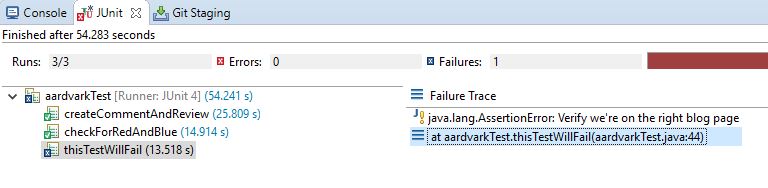
In Script 3 - which you can see here or here, I’ve collected together my tests from scripts 1 and 2 into a single set of Junit tests, and adapted them to work best in the Junit framework,
It’s tempting to have assertions all over the place – but it pays to be sparing. You should only want to check a core set of things per Junit test, and they ideally should relate to the title of your test. The test “checkForRedAndBlue” is pretty obvious (it's our test for blue and red aardvarks) – but if you included assertions for the comments box it could get confusing – when “checkForRedAndBlue” fails, it should be for a reason linked the title. Such checks make much more sense under “createCommentAndReview”.
One difference to that is that I’m using the page title check as confirmation I’m on the right page before continuing. It’s pretty important that I’m on the right page, otherwise everything I check afterwards is pretty pointless. I could have chosen a half dozen attributes and check them ALL – for instance,
• Page title is "I'm hoping that this blog will have the most comments"
• URL is http://testsheepnz.blogspot.co.nz/2016/07/im-hoping-that-this-blog-will-have-most.html
• Page contents include “I'm hoping that this blog will have the most comments”
But it makes more sense to keep it simple (one of our iron rules) and choose something simple to test – so I’ve done with page title.
You will notice if you run this code that test “thisTestWillFail” does exactly what you’d expect … and fails due to a bad assertion. I wanted you to be able to see that – you need the information in your assertion to make sense when this does happen.
Perhaps you’d like to have a go at turning it from an assertion into a validation using exception handling as we’ve seen before?
Extension material
Attempt to create your own JUnit tests for my blog page, and include your own assertions.
Intermission
We're about 2/3 of the way through the curriculum material I've planned out. I'm going to take an intermission at this point and start a new series to look at some Java basics.
As we've gone through this series, the technical difficulty level has been increasing, and I want to provide an opportunity for those who want to get deep into the automation code to get up to speed before we continue into our most important area yet - the one we've all invested all this time to get to ... useful, maintainable checking automation.
To date we’ve had a couple of experiments with Selenium WebDriver using Java – these centered on,
- learning how to use commands
- the basics of the WebDriver / WebElement objects
- how we can manipulate and read page content.
What we haven’t really done so far is create an automated check. Oh, we’ve used "if" statements to do comparisons and put content to screen to see what happens, but much like with our initial testing of dice classes under unit testing, it requires someone to look through screen output and go “yeah … that’s okay”.
In the words of Phillip J. Fry, “that dog won’t hunt, Monsignor”. It's automatic execution, with manual checking. We can do better!
To unlock the power of Selenium WebDriver, you need something which will assert and report if something is true – and in Java that’s the JUnit framework.
The Junit framework allows you to define multiple @Test test methods which are run as part of your build process. An important part of these methods is the assert command such as AssertTrue and AssertFalse.
AssertTrue ( error_txt, Boolean_comparison);
AssertFalse ( error_txt, Boolean_comparison);
These commands are similar – they have two arguments
- error_txt – If the assertion fails, this is the unique identifier that will be written to the Junit log to say what was being asserted, so the person running these tests can work out where the failure occurred and why
- Boolean_comparison – this is the thing you’re comparing (that must reduce to a Boolean true/false result). Pretty much to create most of my assertions, I’ve moved my check from an “if” command to this value under the assertion.
If the assert command fails, then the JUnit test stops immediately, and an error raised in the JUnit log.
Sometimes though you want to check something, but you don’t want it to absolutely fall over if it’s not true – for that you can use a verify tactic.
try {
assertTrue("Verify the page contains that red aardvark",
(element.getText().contains("red aardvark")) );
}
catch (Error e) {
System.out.println("ERROR");
System.out.println(e.toString());
}
This uses the same AssertTrue command, but wraps it in an exception handler (a try … catch command in Java). This allow you to take action if it fails – if the try condition fails, it executes the catch functionality. I’ve just got the catch here printing to the screen that something went wrong here, but you could have it writing to a log file if you want, and have the Java skills.
In Script 3 - which you can see here or here, I’ve collected together my tests from scripts 1 and 2 into a single set of Junit tests, and adapted them to work best in the Junit framework,
It’s tempting to have assertions all over the place – but it pays to be sparing. You should only want to check a core set of things per Junit test, and they ideally should relate to the title of your test. The test “checkForRedAndBlue” is pretty obvious (it's our test for blue and red aardvarks) – but if you included assertions for the comments box it could get confusing – when “checkForRedAndBlue” fails, it should be for a reason linked the title. Such checks make much more sense under “createCommentAndReview”.
One difference to that is that I’m using the page title check as confirmation I’m on the right page before continuing. It’s pretty important that I’m on the right page, otherwise everything I check afterwards is pretty pointless. I could have chosen a half dozen attributes and check them ALL – for instance,
• Page title is "I'm hoping that this blog will have the most comments"
• URL is http://testsheepnz.blogspot.co.nz/2016/07/im-hoping-that-this-blog-will-have-most.html
• Page contents include “I'm hoping that this blog will have the most comments”
But it makes more sense to keep it simple (one of our iron rules) and choose something simple to test – so I’ve done with page title.
You will notice if you run this code that test “thisTestWillFail” does exactly what you’d expect … and fails due to a bad assertion. I wanted you to be able to see that – you need the information in your assertion to make sense when this does happen.
Perhaps you’d like to have a go at turning it from an assertion into a validation using exception handling as we’ve seen before?
Extension material
Attempt to create your own JUnit tests for my blog page, and include your own assertions.
Intermission
We're about 2/3 of the way through the curriculum material I've planned out. I'm going to take an intermission at this point and start a new series to look at some Java basics.
As we've gone through this series, the technical difficulty level has been increasing, and I want to provide an opportunity for those who want to get deep into the automation code to get up to speed before we continue into our most important area yet - the one we've all invested all this time to get to ... useful, maintainable checking automation.
Project Aardvark: Script 3, using assertions and validations with JUnit
/*
* The following reuses previous scripts using JUnit and includes
* both assertions and validations
*
* Mike Talks, Aug 2016
*/
import java.util.concurrent.TimeUnit;
import org.junit.Test;
import static org.junit.Assert.*;
import org.openqa.selenium.By;
import org.openqa.selenium.WebDriver;
import org.openqa.selenium.WebElement;
import org.openqa.selenium.chrome.ChromeDriver;
import org.openqa.selenium.firefox.FirefoxDriver;
import org.openqa.selenium.support.ui.ExpectedCondition;
import org.openqa.selenium.support.ui.Select;
import org.openqa.selenium.support.ui.WebDriverWait;
import com.google.common.base.Verify;
public class aardvarkTest {
@Test
public void thisTestWillFail()
{
System.out.println("thisTestWillFail");
// Create a new instance of the Chrome driver
// This copies all the information about the page we've loaded into
// the page_item object
//WebDriver page_item = new FirefoxDriver();
WebDriver driver = new ChromeDriver();
// Open our target page ... a previous blog article
driver.get("http://testsheepnz.blogspot.co.nz/2016/07/im-hoping-that-this-blog-will-have-most.html");
/*
* THIS NEXT STEP WILL FAIL
*/
//Assert we're on the right page - this will fail outright if not
assertTrue ("Verify we're on the right blog page - THIS WILL FAIL",
driver.getPageSource().contains("THIS TEXT IS WRONG"));
/*
* THE TEST WILL NOT GET FURTHER THAN THIS
*/
// Verify if there is a blue aardvark in the page
try {
assertTrue("Verify the page contains that blue aardvark",
(driver.getPageSource().contains("blue aardvark")) );
}
catch (Error e) {
System.out.println("ERROR");
System.out.println(e.toString());
}
// Verify if there is a blue aardvark in the page
try {
assertTrue("Verify the page contains that red aardvark",
(driver.getPageSource().contains("red aardvark")) );
}
catch (Error e) {
System.out.println("ERROR");
System.out.println(e.toString());
}
// We are now going to capture an element of the current page
// I've used developer tools to find the ID for it
// This is the main body of the piece (and excludes comments & title)
WebElement element = driver.findElement(By.id("post-body-8711143007795160191"));
// Verify if there is a blue aardvark in the post body
try {
assertTrue("Verify the page contains that blue aardvark",
(element.getText().contains("blue aardvark")) );
}
catch (Error e) {
System.out.println("ERROR");
System.out.println(e.toString());
}
// Verify if there is a blue aardvark in the post body
try {
assertTrue("Verify the page contains that red aardvark",
(element.getText().contains("red aardvark")) );
}
catch (Error e) {
System.out.println("ERROR");
System.out.println(e.toString());
}
}
@Test
public void createCommentAndReview()
{
System.out.println("createCommentAndReview");
// Create a new instance of the Chrome driver
// This copies all the information about the page we've loaded into
// the driver object
WebDriver driver = new ChromeDriver();
// Open our target page ... a previous blog article
driver.get("http://testsheepnz.blogspot.co.nz/2016/07/im-hoping-that-this-blog-will-have-most.html");
// Print out the page title
System.out.println("Page title is: " + driver.getTitle());
driver.manage().timeouts().implicitlyWait(1, TimeUnit.SECONDS);
//Find the frame containing "enter your comment"
java.util.List<WebElement> iframes
= driver.findElements(By.tagName("iframe"));
int chosenFrame = -1;
for (int i=0 ; i < iframes.size() ; i++)
{
//This moves you back out of the frame you've just been in
driver.switchTo().defaultContent();
System.out.println("Check frame");
//Select the ith frame
driver.switchTo().frame(i);
if (driver.getPageSource().contains("Enter your comment"))
{
chosenFrame = i;
System.out.println("Found frame");
break;
}
}
// Select to comment as "anonymous"
Select select = new Select(driver.findElement(By.name("identityMenu")));
// select.selectByIndex(8);
select.selectByValue("ANON");
// Select the comment body
String stringComment = "This is my comment";
WebElement element = driver.findElement(By.id("commentBodyField"));
element.sendKeys(stringComment);
// Select to preview
element = driver.findElement(By.id("postCommentPreview"));
element.submit();
//Assert that the stringComment can be seen on the page
assertTrue("Assert that we can see " + stringComment + "on page",
driver.getPageSource().contains(stringComment));
// Verify that we are told "Anonymous said"
try {
assertTrue("Verify the page contains that 'Anonymous said'",
(driver.getPageSource().contains("Anonymous") && driver.getPageSource().contains("said")) );
}
catch (Error e) {
System.out.println("ERROR");
System.out.println(e.toString());
}
}
@Test
public void checkForRedAndBlue()
{
System.out.println("checkForRedAndBlue");
// Create a new instance of the Chrome driver
// This copies all the information about the page we've loaded into
// the page_item object
//WebDriver page_item = new FirefoxDriver();
WebDriver driver = new ChromeDriver();
// Open our target page ... a previous blog article
driver.get("http://testsheepnz.blogspot.co.nz/2016/07/im-hoping-that-this-blog-will-have-most.html");
//Assert we're on the right page - this will fail outright if not
assertTrue ("Verify we're on the right blog page",
driver.getPageSource().contains("I'm hoping that this blog will have the most comments"));
// Verify if there is a blue aardvark in the page
try {
assertTrue("Verify the page contains that blue aardvark",
(driver.getPageSource().contains("blue aardvark")) );
}
catch (Error e) {
System.out.println("ERROR");
System.out.println(e.toString());
}
// Verify if there is a blue aardvark in the page
try {
assertTrue("Verify the page contains that red aardvark",
(driver.getPageSource().contains("red aardvark")) );
}
catch (Error e) {
System.out.println("ERROR");
System.out.println(e.toString());
}
// We are now going to capture an element of the current page
// I've used developer tools to find the ID for it
// This is the main body of the piece (and excludes comments & title)
WebElement element = driver.findElement(By.id("post-body-8711143007795160191"));
// Verify if there is a blue aardvark in the post body
try {
assertTrue("Verify the page contains that blue aardvark",
(element.getText().contains("blue aardvark")) );
}
catch (Error e) {
System.out.println("ERROR");
System.out.println(e.toString());
}
// Verify if there is a blue aardvark in the post body
try {
assertTrue("Verify the page contains that red aardvark",
(element.getText().contains("red aardvark")) );
}
catch (Error e) {
System.out.println("ERROR");
System.out.println(e.toString());
}
}
}
Tuesday, August 16, 2016
AUTOMATION 23 - GUI 10, Switching to Chrome
Technical difficulty: ****
Last week I reported on the recent changes to Selenium WebDriver. Specifically they impacted using Firefox out-of-the-box, meaning you needed to download an position a new driver to make it work.
I was hoping it'd be all sorted by today - but alas no. Although generally good, I'm getting issues on some basics - to confirm it's the new Gecko driver, I've tried running on Chrome, and found the issues vanish.
Update Selenium WebDriver in your project area
Switching to Chrome is relatively easy - but first we need to update our version of WebDriver used in our project. Start with downloading the latest version of Selenium Webdriver here, and extracting it to somewhere on your system (remember where).
Under Eclipse, I've gone into my project gone Build Path -> Configure Build Path
There I've removed the previous .jar files for the last Selenium WebDriver build I've done, and then used Add External Jars to add back in all the new ones.
Put the browser driver into place
The Google Chrome driver (and indeed the Gecko driver) are a form of middleware which acts between the software of the Selenium WebDriver and the browser itself. You'll sometimes hear the word "marionette" used to describe it, because this software essentially "pulls the strings" on your target browser.
Now, you need to download the Google Chrome Driver from here,
Now a little more tricky - to make this work it needs to be copied into your project workspace, for me it goes ...
You might notice I've also placed a version of the Firefox Gecko driver there as well.
Change your code
This is really simple - first off in your header you need to include the following,
import org.openqa.selenium.chrome.ChromeDriver;
This includes the objects and methods needed for the ChromeDriver. You then change your declaration of,
WebDriver driver = new FirefoxDriver();
To ...
WebDriver driver = new ChromeDriver();
That's pretty much it. Although in reality there can be oddities thrown out by a change of browser - I found mine regarding the selection of frame which contains "Enter your comment". I modified my code to use an algorithm which looked through all the frames on the page, selecting the one which says "Enter your comment" ...
I've already committed these changes to my Github page - find me there. Really it's the second project which has had the most revision to include that frame search, which is here.
Subscribe to:
Posts (Atom)